Learning how to automate infographic design with AI opens up new horizons for creating compelling visual content efficiently. By harnessing artificial intelligence, designers and content creators can streamline their workflows, reduce manual effort, and produce professional-grade infographics in a fraction of the time.
This innovative approach integrates powerful AI tools capable of generating templates, visualizing data, and customizing styles automatically. It enables users to interpret complex data sets and transform them into engaging visuals with minimal manual intervention, thereby enhancing productivity and creativity.
Overview of AI-driven infographic design
In the rapidly evolving landscape of digital content creation, artificial intelligence (AI) has emerged as a transformative force, particularly in the realm of infographic design. Automating infographic creation with AI entails leveraging advanced algorithms and machine learning models to generate visually compelling and data-rich graphics efficiently. This approach not only accelerates the design process but also enhances the accuracy and consistency of visual representations of complex data.
Integrating AI into graphic design workflows offers numerous advantages, including increased productivity, reduced manual effort, and the ability to produce personalized and adaptive visual content. As AI tools become more sophisticated, they enable designers and non-designers alike to create professional-quality infographics without extensive technical skills. Currently, several popular AI-powered platforms serve as valuable resources for infographic development, each offering unique features tailored to different user needs and levels of expertise.
Automating infographic creation with artificial intelligence
Automating infographic creation involves utilizing AI algorithms to analyze data, determine key insights, and generate visual layouts that effectively communicate information. These systems can automatically select appropriate chart types, color schemes, iconography, and typography based on the data context and user preferences. By doing so, they eliminate much of the manual trial-and-error traditionally associated with graphic design, allowing for rapid iteration and customization.
Advantages of integrating AI in graphic design workflows
The adoption of AI in infographic design workflows introduces several strategic benefits that are increasingly vital in today’s fast-paced digital environment:
- Efficiency and Speed: AI-driven tools significantly reduce the time required to produce high-quality infographics, enabling businesses to respond swiftly to evolving data and presentation needs.
- Consistency and Accuracy: Automated design processes help maintain branding consistency and minimize human errors, ensuring that visual content aligns with organizational standards.
- Accessibility and User-Friendliness: AI platforms often feature intuitive interfaces, empowering users with varying levels of design expertise to create professional visuals without specialized training.
- Data-Driven Personalization: AI enables the customization of infographics based on target audiences, tailoring visual narratives to enhance engagement and comprehension.
- Cost-Effectiveness: Automating repetitive design tasks reduces labor costs and resource expenditure, making infographic production more economical for organizations of all sizes.
Popular AI tools and platforms for infographic development
Several AI-powered tools have gained popularity for their capabilities in streamlining infographic creation:
| Tool/Platform | Features | Use Cases |
|---|---|---|
| Canva | AI-assisted design suggestions, template customization, automatic color palette generation | Marketing visuals, social media graphics, basic infographics |
| Piktochart | Data visualization automation, AI-powered layout recommendations, drag-and-drop interface | Business reports, educational materials, interactive infographics |
| Venngage | Smart templates, AI-driven content placement, branding automation | Corporate presentations, data storytelling, marketing campaigns |
| Visme | AI-powered data widgets, customizable templates, real-time collaboration | Data dashboards, educational infographics, professional reports |
| Designs.ai | Automated branding, logo generation, AI-driven graphic layout | Branding projects, rapid content creation, multimedia presentations |
As these tools continue to advance, they are democratizing the creation of high-quality infographics, enabling both professionals and novices to communicate data visually with unprecedented ease and effectiveness.
Key features of AI tools for infographic automation
Artificial Intelligence-driven infographic tools have revolutionized how visual content is created by offering sophisticated functionalities that streamline the design process. These features not only enhance creativity but also significantly reduce the time and effort required to produce compelling graphics. Understanding the core capabilities of these tools is essential for leveraging their full potential in your visual communication strategy.
AI-powered infographic software typically combines advanced algorithms with user-friendly interfaces to facilitate template generation, data visualization, and style customization. These functionalities work together to automate routine tasks while providing options for personalization, enabling users to craft professional-quality infographics efficiently and effectively.
Template Generation and Design Automation
One of the fundamental features of AI tools is their ability to automatically generate templates based on the user’s input or specific data types. By analyzing the content, the AI suggests visually appropriate layouts, color schemes, and design elements that align with current aesthetic trends. This process accelerates the initial stages of infographic creation, allowing users to focus more on content refinement.
Design automation extends beyond templates; it involves intelligent suggestions for layout adjustments, font pairing, and element placement that enhance readability and visual appeal. These tools often incorporate machine learning algorithms that learn user preferences over time, tailoring suggestions to individual styles and project requirements.
Data Visualization
Transforming raw data into engaging visuals is a core function of AI-infused infographic tools. These platforms interpret complex datasets through algorithms that identify the most effective visual representations, such as bar charts, pie charts, heatmaps, or network diagrams. By automating this process, they ensure accurate and insightful depiction of data trends and relationships without requiring extensive manual input.
AI algorithms analyze data attributes—such as distribution, correlation, and scale—to recommend the most suitable visualization types, enhancing clarity and impact.
This intelligent data interpretation not only saves time but also minimizes errors that can occur with manual chart creation, ensuring that insights are communicated clearly and convincingly.
Style Customization and Branding
While automation handles the structural aspects of infographic creation, style customization allows users to maintain brand consistency and personal preferences. AI tools offer extensive options for customizing color palettes, fonts, icons, and backgrounds through intuitive interfaces. Some platforms incorporate style transfer algorithms that adapt existing branding elements seamlessly into new designs.
This feature ensures that generated infographics adhere to established visual standards, fostering brand recognition and professionalism across different projects. Additionally, AI-driven style suggestions can introduce users to innovative design trends, expanding their creative horizons.
Comparison of AI-Based Infographic Software Options
To facilitate an informed selection process, the following table compares several prominent AI-driven infographic tools based on their features, pricing models, and ease of use:
| Name | Features | Pricing | Ease of Use |
|---|---|---|---|
| Visme | Template generation, data visualization, branding options, collaboration tools | Free tier; paid plans start at $25/month | Intuitive drag-and-drop interface suitable for beginners and professionals |
| Canva Pro | AI-powered design suggestions, extensive templates, style customization, data charts | $12.99/month (per user) | User-friendly with guided tutorials and automation features |
| Piktochart | Automated templates, data mapping, style presets, export options | Basic plan at $29/month; enterprise pricing available | Accessible interface aimed at non-designers |
| Venngage | Smart templates, data visualizations, branding tools, team collaboration | Starting at $19/month | Straightforward with guided workflows for quick creation |
| Designs.ai | AI-generated templates, data-driven visuals, style customization, brand kits | Subscription plans from $29/month | Designed for ease of use, with guided automation processes |
Choosing the right AI infographic tool depends on specific project needs, budget constraints, and user expertise. Each platform offers unique advantages, whether it’s advanced data visualization, comprehensive branding options, or intuitive interfaces that cater to beginners.
How AI Algorithms Interpret Data for Visual Recommendations
AI algorithms utilize machine learning and data analysis techniques to interpret datasets and suggest optimal visual representations. These algorithms analyze various data attributes—such as distribution, variance, correlations, and data type—to determine the most effective visualization method.
For instance, when presented with a dataset showing regional sales figures, the AI might recommend a heatmap to highlight geographic variations. If the data involves multiple variables with relationships, a scatter plot or network diagram might be suggested. The system evaluates the data’s structure and context, providing visual options that maximize clarity and insight.
Through continuous learning from user interactions and feedback, AI tools refine their recommendations, adapting to individual preferences and evolving best practices. This intelligent interpretation ensures that even users with limited design experience can produce infographics that are both accurate and visually compelling.
Step-by-step process of automating infographic design with AI
Automating infographic creation through AI involves a structured sequence of steps that streamline the transformation of raw data into visually compelling graphics. This process leverages the capabilities of advanced algorithms to minimize manual effort, enhance accuracy, and ensure consistency across designs. Understanding each stage in detail allows users to optimize their workflows and achieve professional-quality infographics efficiently.
By systematically following these steps—beginning with data input, progressing through AI-driven processing, and concluding with output customization—users can harness AI tools to produce insightful and engaging infographics tailored to diverse communication needs and audiences.
Data Input and Preparation
The initial phase focuses on gathering and organizing data in formats that are compatible with AI analysis. High-quality, clean data ensures that the AI system can accurately interpret and visualize information. Data should be structured systematically, preferably in spreadsheet formats like CSV or Excel, with clear labels for each variable. Removing inconsistencies, duplicates, and irrelevant information enhances the AI’s ability to generate meaningful visualizations.
Preparing data also involves selecting relevant datasets that align with the infographic’s purpose. For instance, demographic statistics should be recent, accurate, and sourced from reputable organizations. Incorporating contextual metadata, such as units of measurement or timeframes, provides clarity and aids the AI in producing precise visual narratives.
AI Processing and Visualization Generation
Once data is prepared, AI tools process this information through algorithms that analyze patterns, identify key insights, and determine the most effective visualization techniques. Features like automatic chart selection, color palette optimization, and layout planning are employed to create a cohesive and visually appealing design.
Advanced AI systems may utilize natural language processing to generate descriptive headings or annotations, enhancing the storytelling aspect of the infographic. Machine learning models continually improve their output by learning from previous designs and user feedback, leading to increasingly refined results. During this stage, AI might also suggest alternative visual formats or highlight significant data points to emphasize critical insights.
Output Customization and Finalization
The final stage involves customizing the AI-generated infographic to meet specific branding, style, or thematic requirements. Users can modify color schemes, fonts, logos, and layout arrangements using integrated editing tools. This flexibility ensures that the automated design aligns seamlessly with organizational standards or personal preferences.
Additionally, output customization includes reviewing the visualizations for accuracy and clarity, making adjustments as needed to enhance readability or emphasize particular data insights. Export options allow users to save the finalized infographic in various formats suitable for digital sharing, printing, or embedding into reports. Iterative refinement during this phase guarantees a professional presentation that effectively communicates the intended message.
Organizing the Automation Workflow with a Flowchart
To illustrate the entire process, a flowchart provides a clear visualization of each stage, involved AI features, and decision points:
| Stage | Description | AI Features Involved |
|---|---|---|
| Data Collection & Preparation | Gathering relevant data, cleaning, and formatting for analysis. | Data validation, cleaning algorithms, metadata tagging. |
| Data Import | Uploading structured data into the AI platform for processing. | Data ingestion modules, format compatibility checks. |
| Analysis & Pattern Recognition | AI analyzes data to identify key trends and insights. | Pattern detection, statistical modeling, anomaly detection. |
| Visualization Generation | AI creates initial infographic layouts and charts based on insights. | Automatic chart selection, color optimization, layout planning. |
| Output Customization | Refining visual elements, branding, and presentation details. | Design editing tools, style presets, branding modules. |
| Final Review & Export | Final adjustments, quality assurance, and exporting in desired formats. | Preview features, export options, annotation tools. |
Methods to Prepare Data for Optimal AI Analysis and Visualization
Effective data preparation is critical to maximize the insights and aesthetic quality of AI-generated infographics. Several methods enhance data readiness for analysis:
- Data Cleaning: Remove inaccuracies, duplicates, and inconsistencies to ensure the AI processes accurate information. Use validation tools to identify missing or anomalous data points.
- Data Structuring: Organize data into clear, labeled columns and rows, ensuring each variable is properly defined. Use standard formats like CSV or Excel, with consistent data types.
- Metadata Inclusion: Attach descriptive metadata, such as units, dates, or categories, to provide context that guides AI interpretation.
- Data Segmentation: Break large datasets into meaningful subsets aligned with different aspects of the intended infographic, facilitating focused analysis.
- Source Verification: Use reputable, up-to-date sources to ensure data credibility, which in turn enhances trustworthiness of the infographic outputs.
Effective data preparation not only ensures accuracy but also enhances the relevance and visual impact of AI-driven infographics, leading to more compelling storytelling and audience engagement.
Techniques for Integrating AI Tools into Existing Design Workflows

Seamless integration of AI-powered infographic design tools into current workflows enhances efficiency, consistency, and creativity within graphic design projects. Effective integration ensures that AI functionalities complement traditional processes, allowing designers to leverage automation without disrupting established practices. Understanding the procedures for connecting AI platforms with existing software and automation systems is essential for maximizing the benefits of AI-driven design automation.
Implementing these techniques involves establishing reliable connections between AI platforms and popular graphic design software, utilizing APIs and automation scripts, and developing cohesive workflows that streamline the entire infographic creation process. Proper integration minimizes manual intervention, accelerates project completion, and fosters innovative design solutions tailored to evolving client needs.
Connecting AI Platforms with Graphic Design Software
Establishing a robust connection between AI tools and graphic design software is fundamental to automation. This can be achieved through several methods, including direct API integration, plugin development, or middleware solutions that facilitate communication between systems. Many AI platforms offer RESTful APIs, enabling developers to embed AI functionalities directly into design applications like Adobe Illustrator or Canva.
To connect these systems effectively:
- Obtain API credentials from the AI platform, ensuring secure access.
- Use SDKs or RESTful API endpoints to send requests for infographic data generation or editing.
- Integrate API calls within the design software via scripting languages such as JavaScript, Python, or specialized plugin frameworks.
- Test connection stability and data exchange to ensure seamless operation before full deployment.
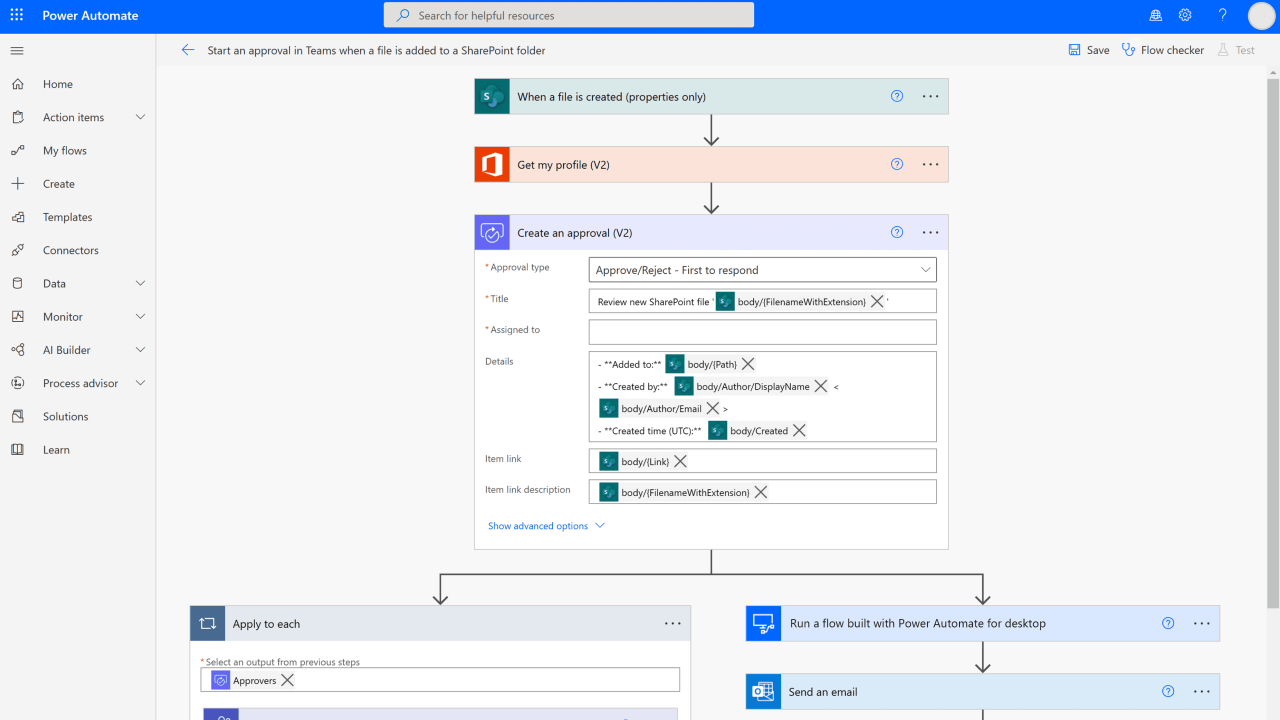
For instance, integrating an AI-powered content generation API into Adobe Illustrator might involve creating a custom plugin that sends design parameters and retrieves generated visual content or data visualizations, which are then embedded directly into the workspace.
Automation Scripts and APIs for Seamless Integration
Automation scripts and APIs act as the backbone for facilitating smooth AI-software integration, enabling batch processing, real-time updates, and dynamic content creation. These tools reduce manual effort and ensure consistency across multiple infographic designs, especially in large-scale projects or recurring templates.
Key procedures include:
- Developing custom scripts using scripting languages compatible with the design software (e.g., ExtendScript for Adobe products, Python for data handling).
- Utilizing APIs provided by AI platforms to automate data retrieval, visualization, and layout adjustments.
- Implementing webhook notifications or event-driven scripts to trigger AI tasks based on design changes or project milestones.
- Creating error-handling routines to manage API failures or data inconsistencies, ensuring resilient workflows.
Embedding AI capabilities directly into design scripts enables real-time updates, such as automatically adjusting infographic elements based on fresh data or AI-generated insights, significantly reducing turnaround times.
Example Workflows Comparing Manual and Automated Processes
Below is a comparison of typical manual infographic design steps versus automated workflows powered by AI integration, structured in a four-column responsive layout for clarity:
| Manual Workflow | Automated Workflow |
|---|---|
| Gather data, create initial sketches, and select visual templates manually. | Use AI tools to automatically analyze data and suggest suitable visual templates based on content type and target audience. |
| Design elements are manually adjusted, aligned, and customized within the software. | Leverage AI-driven layout algorithms to automatically position, resize, and style infographic components for optimal visual balance. |
| Apply data visualizations and finalize the infographic with manual refinements. | Generate data visualizations via AI APIs, which are then integrated into the design with minimal manual adjustment, supported by automation scripts for consistency. |
| Export and review the finished infographic. | Automated export processes, including batch output, format conversions, and quality checks, are handled through integrated scripts. |
Customization and Editing of AI-Generated Infographics
While AI-driven tools excel at rapidly generating visually appealing infographics, tailoring these outputs to align with specific branding standards and communication goals is essential. Effective customization ensures that the final infographic not only conveys the intended message but also maintains consistency with your brand identity and style guidelines. This process involves refining layouts, adjusting color schemes, editing data labels, and leveraging AI suggestions as adaptable templates for manual enhancements.
By understanding how to refine AI outputs, creators can produce infographics that are both visually cohesive and highly personalized, ultimately increasing their impact and relevance for target audiences.
Refining and Personalizing AI Outputs for Branding Consistency
Achieving branding consistency in AI-generated infographics requires strategic adjustments that align with your organization’s visual identity. This involves modifying color palettes, fonts, logos, and other visual elements to reflect your brand’s style guide. AI tools often allow users to save custom color schemes and font selections, which can be applied across multiple projects to maintain uniformity.
Consistent branding enhances recognition and reinforces your organization’s credibility across all visual content.
Moreover, refining AI outputs includes reviewing the overall layout to ensure that the content hierarchy aligns with your messaging priorities. Incorporating brand-specific icons or imagery into the infographic can further reinforce identity, transforming generic templates into personalized visual assets.
Adjusting Layouts, Color Schemes, and Data Labels Post-Generation
Post-generation editing offers valuable opportunities to enhance the clarity and aesthetic appeal of infographics. Adjusting layouts involves repositioning elements to improve visual flow and readability, especially when the AI layout does not perfectly suit the data’s story. Modifying color schemes not only aligns the infographic with brand colors but also improves accessibility for viewers with color vision deficiencies.
Data labels are crucial for conveying precise information; editing these labels ensures accuracy and clarity. Many AI tools enable direct manipulation of text and graphical elements, allowing users to resize, reposition, or reformat data labels, titles, and legends to improve comprehension.
Well-executed adjustments post-generation can significantly elevate the infographic’s professional appearance and communicative effectiveness.
It is advisable to review the infographic on different devices and screens after making adjustments, ensuring that the visual modifications translate well across various viewing contexts. This iterative process helps craft a polished final product that resonates with your intended audience.
Utilizing AI Suggestions as Foundational Templates for Manual Edits
AI-generated infographics often serve as excellent starting points, providing foundational designs upon which further manual edits can be built. By treating these outputs as templates, designers can incorporate additional branding elements, custom data visualizations, or narrative components that better suit specific campaigns or reports.
Most AI tools facilitate exporting the generated infographic in editable formats such as vector graphics or layered files, enabling precise manual modifications. This flexibility allows users to adapt AI suggestions to complex project requirements, adding custom annotations, adjusting graphical styles, or integrating multimedia elements seamlessly.
Leveraging AI outputs as adaptable templates streamlines the workflow, combining the efficiency of automation with the precision of manual customization.
In practice, this approach ensures that the initial AI-generated design accelerates the creation process while still offering ample scope for personalization, ultimately producing infographics that are both visually compelling and aligned with your strategic branding objectives.
Challenges and limitations of AI-powered infographic automation
Automating infographic design with AI offers numerous advantages, including efficiency gains and consistency. However, it also presents several challenges and limitations that organizations need to understand and address to maximize the effectiveness of AI-driven tools. Recognizing these issues is essential for developing strategies to mitigate their impact and ensure high-quality output.AI-powered infographic automation can sometimes produce content that does not fully align with the intended message or visual style, due to inherent limitations in current algorithms.
These challenges stem from technical constraints, data quality issues, and the complexity of human creativity and contextual understanding. Addressing these limitations involves a critical evaluation of AI outputs and implementing measures to enhance accuracy, relevance, and aesthetics.
Data misinterpretation and accuracy issues
Data misinterpretation remains a significant challenge in AI-driven infographic creation. AI models analyze large datasets to generate visual representations; however, they can sometimes misinterpret data points or statistical insights, leading to misleading visuals. This may happen due to insufficient training data, biased datasets, or the inability of AI to understand nuanced context.To verify AI-generated content’s accuracy and relevance, it is crucial to incorporate validation steps.
Human oversight plays a vital role, whereby experts review the data visualizations to ensure they accurately reflect the underlying data. Cross-referencing AI outputs with original data sources helps identify discrepancies and prevent the dissemination of incorrect information.
Style mismatches and aesthetic inconsistencies
Maintaining consistent visual styles across infographics is essential for brand coherence and professional appearance. AI tools may generate visuals that vary in style, color schemes, or layout, especially when multiple tools or templates are used. These mismatches can undermine brand identity and reduce the visual appeal of the infographics.Strategies to address style mismatches include establishing comprehensive style guides and templates that AI tools can reference during design.
Additionally, customizing AI outputs with manual adjustments ensures that visuals align with brand standards. Regular calibration of AI tools and feedback loops help improve their ability to produce stylistically consistent content over time.
Limitations in creativity and originality
AI algorithms primarily generate designs based on existing data and predefined patterns, which can limit creativity and originality. This restriction might result in infographics that lack innovative ideas or fail to engage audiences effectively. AI-generated visuals often follow predictable templates, which can lead to repetitive or uninspired results.Overcoming this limitation involves combining AI automation with human creativity. Creative professionals can use AI-generated drafts as starting points, then customize and enhance visuals with unique elements.
Continual training of AI models on diverse datasets also promotes a broader range of design options, fostering more inventive and engaging infographics.
Technical limitations and output quality
Despite advances, AI tools are constrained by current technological capabilities, such as processing power, algorithm sophistication, and available training data. These limitations can affect the quality, resolution, and detail of the generated infographics, sometimes resulting in pixelated images, misaligned elements, or incomplete designs.To improve output quality, organizations should invest in high-performance hardware and utilize the latest AI models optimized for visual design tasks.
Regular updates and fine-tuning of AI tools, combined with iterative human review, help identify and rectify technical issues early in the creation process. Developing robust workflows that integrate AI outputs with manual refinement ensures consistently high-quality infographics.
Future Trends in AI-Based Infographic Design Automation

As artificial intelligence continues to evolve, its role in automating and enhancing infographic design is poised for significant advancements. Emerging technologies are set to redefine the capabilities of AI tools, enabling more dynamic, personalized, and efficient design processes. Exploring these future trends offers valuable insights into how visual communication will transform in the coming years, providing designers and organizations with innovative solutions to better engage their audiences.The integration of sophisticated algorithms such as deep learning and generative models promises to elevate AI-driven infographic design from rule-based automation to intuitive, creative collaboration.
These technologies will not only streamline the creation of static infographics but also facilitate real-time, adaptive visualizations that respond to changing data inputs and audience preferences. As a result, future AI tools will offer unprecedented levels of customization, interactivity, and responsiveness, making data storytelling more compelling and accessible.
Emerging Technologies Shaping Future Infographic Automation
The development of advanced AI methodologies, including deep learning and generative models like GANs (Generative Adversarial Networks), is central to upcoming innovations in infographic design. These technologies enable machines to learn complex visual patterns, understand contextual data, and generate original visual content that aligns with specific thematic and stylistic requirements. Such capabilities are expected to dramatically reduce manual input and enable the automatic production of high-quality, tailored infographics.Deep learning models, trained on vast datasets, will become increasingly adept at recognizing nuanced visual trends and user preferences.
Generative models, on the other hand, will facilitate the creation of diverse graphic elements, layouts, and even entire infographic templates that adapt to various domains and audiences. This shift will allow for more personalized and engaging visual storytelling, reducing the time and effort required from human designers.
Enhanced Capabilities and Descriptive Future Scenarios
Current AI tools primarily assist in automating repetitive tasks and generating basic layouts. In contrast, future capabilities will include complex real-time data visualization, where AI continuously updates infographics based on live data streams. For example, a financial dashboard could automatically refresh to display current market trends, with AI-generated insights highlighted through dynamic visual cues.Another anticipated development involves adaptive templates that learn from user interactions and preferences over time.
These templates will automatically modify their structure, style, and content placement to improve readability and impact. For instance, a marketing team could start with a standard report template, and AI would customize the layout based on specific campaign data and audience engagement metrics, resulting in highly targeted presentations without manual redesign.
“Future AI-powered infographic tools will blend real-time data processing with intelligent design adaptation, enabling truly interactive and personalized visual storytelling experiences.”
Potential Developments in Visualization and Workflow Integration
In the future, real-time data visualization will become a core feature of AI infographic tools, transforming static representations into living visual narratives. This technological leap will empower users to monitor dynamic data, such as social media trends or economic indicators, with instant visual updates that reflect the latest information. Such capabilities will be particularly valuable in areas like crisis management, marketing analytics, and scientific research.Furthermore, AI-driven infographic systems are expected to seamlessly integrate into existing digital workflows.
This integration will promote continuous, automated content updates within project management and data analysis platforms, reducing bottlenecks and accelerating decision-making processes. For example, AI could automatically generate and update infographics within collaborative tools like Slack or Microsoft Teams, ensuring stakeholders receive timely visual insights aligned with ongoing discussions.
“By combining real-time data visualization with adaptive templates and workflow integration, AI will make infographic design more responsive, personalized, and embedded within the digital ecosystem.”
Closure

In summary, mastering how to automate infographic design with AI provides significant advantages in speed, consistency, and customization. As technology continues to evolve, embracing these tools will become essential for staying competitive in digital content creation, opening doors to more dynamic and adaptive visual storytelling.