Discover how to create professional slides with AI and transform your presentation design process. Harnessing powerful AI tools not only streamlines content creation and visual design but also ensures consistency and a polished look that captivates your audience. Embark on this journey to enhance your presentation skills with innovative AI-driven techniques that save time and elevate your visual storytelling.
This guide explores selecting the right AI tools, structuring content efficiently, designing with AI-generated templates, incorporating compelling visuals, and maintaining professionalism throughout your slides. By integrating these advanced techniques, you can craft impressive, engaging presentations that stand out in any setting.
Understanding the Role of AI in Creating Professional Slides
Artificial Intelligence (AI) has become an integral component in modern presentation design, transforming how professionals craft visually compelling slides efficiently. By leveraging AI-powered tools, creators can automate routine tasks, enhance visual aesthetics, and maintain consistency across their presentation decks. This integration not only streamlines the workflow but also elevates the overall quality of slides, enabling users to focus more on content delivery and strategic messaging.
AI tools serve as virtual assistants in slide creation by offering intelligent suggestions, automating design adjustments, and providing access to vast libraries of high-quality visual assets. These features empower users to produce polished, engaging presentations without requiring extensive graphic design expertise. As a result, AI-driven solutions are increasingly favored by business professionals, educators, and marketers aiming to deliver impactful messages with efficiency and professionalism.
AI-Powered Features for Slide Creation
Understanding the specific functionalities of AI tools can significantly enhance the slide development process. The following features are particularly beneficial for creating professional presentations:
| Feature | Description |
|---|---|
| Design Suggestions | AI analyzes slide content and recommends suitable layouts, color schemes, and font pairings to ensure visual harmony and readability. For example, tools like Canva’s AI design assist can automatically adapt layouts based on the type of content being added. |
| Automated Image Selection | AI algorithms can suggest relevant images or icons by interpreting the slide’s context, saving time in searching for suitable visuals. An example includes PowerPoint’s Designer feature, which offers contextually appropriate visual options that enhance message clarity. |
| Content Optimization | Some AI tools can refine text for clarity, conciseness, and impact, ensuring that slides communicate their message effectively. Grammarly’s AI-powered suggestions, for example, can improve sentence structure and eliminate redundant information. |
| Template Customization | AI-driven templating provides dynamic design options tailored to the presentation topic and audience, maintaining brand consistency while allowing for personalized customization. This is particularly valuable for corporate branding and marketing pitches. |
| Consistency Enforcement | AI ensures uniformity in font sizes, colors, and spacing across multiple slides, preserving a professional aesthetic throughout the presentation deck. This reduces manual adjustments and enhances visual cohesion. |
Integrating these AI features into the slide creation process leads to substantial benefits. Primarily, it enhances time efficiency by automating design and content suggestions, thereby reducing manual effort. Additionally, AI promotes consistency, ensuring that each slide aligns with the overall visual theme, which is crucial for maintaining professionalism and audience engagement. Ultimately, AI-driven tools democratize high-quality presentation design, making professional slide creation accessible to users regardless of their graphic design background.
Selecting the Right AI Tools for Slide Design
Choosing the most suitable AI-powered presentation tools is crucial for creating professional, visually appealing, and impactful slides efficiently. With the rapid growth of AI technology in the design space, numerous platforms offer diverse features tailored to different needs, skill levels, and budgets. Making an informed selection ensures that you leverage the best capabilities for your specific presentation goals, whether it involves automation, customization, or seamless integration with existing software.
When evaluating AI tools for slide design, it is important to consider factors such as ease of use, feature set, output quality, compatibility with other applications, and cost. These elements influence not only the quality of the final presentation but also the overall workflow efficiency and user experience. The right choice can significantly reduce design time, enhance creativity, and improve audience engagement.
Popular AI Software and Platforms for Presentation Creation
Numerous AI-driven platforms have emerged as leaders in the presentation creation arena, each offering unique features suited to various professional and educational contexts. Some of the most recognized tools include:
- Beautiful.ai
- Canva with AI features
- Designs.ai
- Visme
- Decktopus
These platforms typically combine AI-driven automation with intuitive interfaces, enabling users to generate aesthetically consistent slides, automate design elements, and even suggest content improvements. The choice among them depends on specific project requirements, such as collaboration needs, customization options, and integration capabilities.
Comparative Table of AI Presentation Tools
Below is a comparative overview of some prominent AI-powered presentation tools, highlighting their main features, compatibility, and cost considerations to assist in making an informed decision:
| Tool Name | Main Feature | Compatibility | Cost |
|---|---|---|---|
| Beautiful.ai | Automated design suggestions and smart templates | Web-based, integrates with Slack and Google Drive | Free basic plan; Pro plan at $12/month |
| Canva with AI | AI-powered design recommendations and content generation | Web, iOS, Android; integrates with numerous apps | Free tier; Pro plan at $12.99/month |
| Designs.ai | AI-driven video and presentation creation | Web-based; cloud storage integration | Starting at $39/month |
| Visme | Rich visualization tools with AI-enhanced features | Web-based; compatible with Google Workspace | Individual plan from $25/month |
Note: Pricing may vary based on additional features, team licensing, or enterprise options. It’s advisable to explore trial versions where available to assess usability and output quality before committing to a subscription.
Planning and Structuring Content with AI
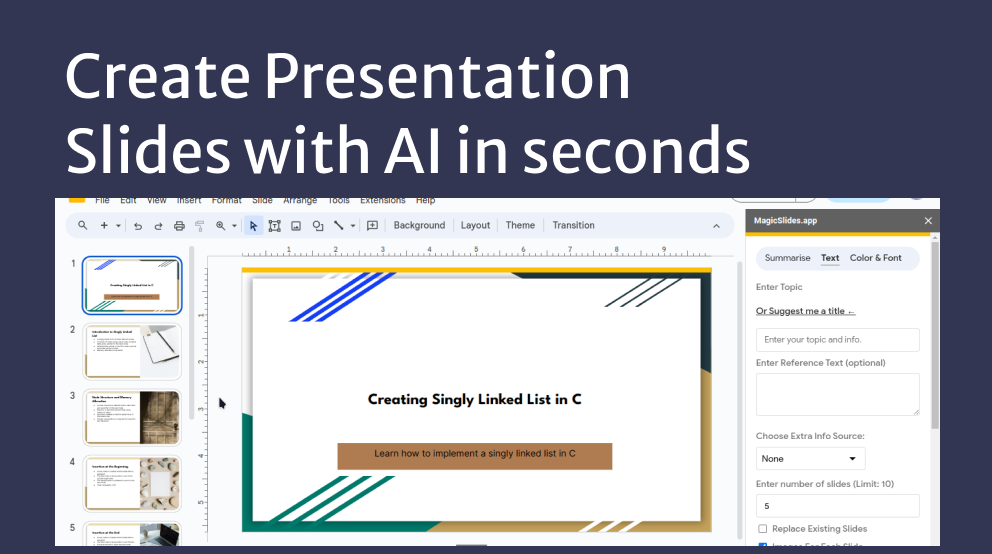
Effective presentation delivery depends heavily on how well the content is organized and structured. Leveraging AI tools to plan and arrange your presentation ensures clarity, logical flow, and audience engagement. These technologies assist in transforming raw ideas into cohesive slide sequences, saving time and enhancing the overall quality of your presentation.
AI-powered platforms can analyze your key points, identify relationships among concepts, and suggest optimal slide arrangements. By doing so, they help presenters establish a clear narrative, prioritize information, and create a visually appealing flow. This process not only streamlines the planning phase but also promotes consistency and professionalism across all slides.
Organizing Presentation Content Using AI-assisted Software
Using AI-assisted software involves inputting your core topics and supporting points, after which the AI analyzes and suggests logical structures. These tools often come with templates or frameworks that can be customized to fit specific presentation goals. They can automatically group related ideas into sections, recommend the order of slides, and even propose transition points for smooth storytelling.
For example, a business professional preparing a quarterly report might input key data points such as sales figures, market analysis, and strategic initiatives. The AI then generates a structured Artikel with slides dedicated to each main topic, along with suggested subsections or visual elements to emphasize critical information. This approach ensures comprehensive coverage while maintaining a coherent narrative arc.
Inputting Key Points for AI to Generate Slide Structures
Providing clear, concise key points is vital for AI to effectively assist in slide structuring. When entering information, focus on the main ideas, supporting details, and desired visual emphasis. Many AI tools accept text inputs, bullet points, or brief summaries, which they analyze to determine logical groupings and appropriate slide layouts.
For instance, if you input the main idea “Customer Satisfaction,” along with supporting points like “Response time,” “Customer feedback surveys,” and “Loyalty programs,” the AI can generate a slide that introduces the concept, followed by detailed content sections. These sections can be graphically represented with data visualizations or icons, making the content more engaging and easier to understand.
Sample Slide Structure Table
To facilitate clear visualization, here is a sample HTML table illustrating how AI can organize slide content. This structure includes essential components such as slide number, title, content summary, and visual suggestions:
| Slide Number | Title | Content Summary | Visual Suggestions |
|---|---|---|---|
| 1 | Introduction to Market Trends | Overview of recent market developments, key growth areas, and emerging challenges. | Line chart showing growth over the last five years; relevant icons representing sectors. |
| 2 | Sales Performance Analysis | Comparison of quarterly sales figures, highlighting peaks and dips, with brief explanations. | Bar graph with color-coded quarters; trend line overlay for performance insights. |
| 3 | Customer Feedback Insights | Summary of survey results emphasizing satisfaction levels and areas for improvement. | Pie chart illustrating satisfaction percentages; speech bubble icons for feedback comments. |
| 4 | Strategic Initiatives | Key strategies to enhance market share, including new product launches and marketing campaigns. | Flow diagram showing strategic steps; icons representing products and marketing channels. |
| 5 | Conclusion and Next Steps | Recap of main points and recommended actions for stakeholders. | Checklist icons; bolded action items; summary infographic. |
Designing Slides with AI-Generated Templates and Layouts

Leveraging AI to design slides enhances efficiency and ensures visual consistency. AI-driven tools can recommend a variety of slide templates and layouts tailored to the specific content type, streamlining the slide creation process. This approach not only saves time but also elevates the professional appearance of presentations by aligning designs with best practices and branding standards.
AI recommends slide templates based on the nature of the content, enabling users to select layouts that best communicate their message. Additionally, these recommendations can be customized to reflect branding elements such as color schemes, logos, and font styles, ensuring a cohesive visual identity across all presentation materials.
AI-Recommended Layout Options
AI systems analyze the content to suggest suitable slide layouts that enhance clarity and engagement. Different layout options generated by AI include:
| Layout Type | Description and Use Cases |
|---|---|
| Title Slide | This layout emphasizes the presentation’s main title, subtitle, and often the presenter’s name or date. Ideal for opening slides to set the tone. |
| Comparison | Designed to juxtapose two or more items, such as before-and-after scenarios or contrasting product features. Useful for highlighting differences clearly. |
| Infographic | Combines visual elements like charts, icons, and images with minimal text to present data or processes dynamically. Suitable for data-heavy content. |
| Conclusion | Summarizes key points with a clear call-to-action or closing remarks. Typically involves bullet points and a clean layout for emphasis. |
To customize AI-suggested layouts for branding purposes, users can follow these procedures:
- Access the slide layout options recommended by the AI within the presentation tool.
- Apply the preset layout to the slide, then select the design or theme settings to match your branding palette.
- Adjust font styles and sizes to align with your branding guidelines, ensuring consistency across slides.
- Incorporate your logo and other brand elements into designated placeholders or footer areas.
- Review the overall design for visual harmony, making sure that the customized layout maintains clarity and engagement.
“AI-powered template customization allows for rapid adaptation to corporate branding, ensuring professional and consistent presentations without extensive manual adjustments.”
Using AI for Visual and Graphic Elements

Creating visually engaging slides requires compelling graphics and images that complement the message. AI-powered tools have revolutionized this process by enabling users to generate and select high-quality visuals efficiently. Leveraging AI for visual elements not only enhances the aesthetic appeal but also ensures consistency and relevance across the presentation. This section explores the steps to generate or select images via AI, how to craft detailed descriptions for custom visuals, and methods to integrate AI-created graphics seamlessly into slides.AI-driven visual content creation involves a systematic approach that begins with defining your visual needs and ends with embedding the visuals into your presentation.
The process starts by choosing appropriate AI tools designed for image generation or graphic design, such as DALL·E, Midjourney, or Canva’s AI features. These platforms enable users to input descriptive prompts to produce images aligned with their slide themes, whether they involve abstract concepts, detailed illustrations, or realistic photographs. The next step is to craft comprehensive, detailed descriptions that guide AI to generate visuals closely matching your requirements.
Precise language, including specific subjects, styles, colors, and contexts, ensures the AI understands the nuances of your desired output.Incorporating AI-generated graphics into slides requires attention to visual harmony and file compatibility. After creating or selecting the visuals, they should be optimized for clarity and resolution, ensuring they appear professional and crisp. Using presentation software, such as PowerPoint or Google Slides, you can seamlessly insert these images, adjusting size and position to align with your layout.
Maintaining consistency in style, color schemes, and thematic elements across visuals enhances overall cohesiveness.
Steps to Generate or Select Images and Graphics via AI
Effective visual content begins with clear objectives and detailed prompts. Start by identifying the core message or concept the image should convey. Select an AI tool suitable for your needs, considering factors such as output quality, customization options, and ease of use. Input a descriptive prompt that encapsulates your visual idea, ensuring to specify relevant details like subject, style, color palette, and context.
For example, instead of a generic prompt like “business meeting,” use a detailed description: “A professional team collaborating around a conference table in a modern office, with diverse genders and ethnicities, in a realistic style with vibrant colors.” Review the generated images and select the most fitting visual, or refine your prompts for better accuracy.
Creating Deep Descriptive Explanations for Custom Visuals
Providing comprehensive descriptions is essential for AI to produce visuals that align precisely with your vision. Think of the description as a set of instructions that guide AI’s creative process. Include details about the main elements, such as subjects, background, mood, and style. For instance, if creating an infographic about renewable energy, specify: “An infographic showing solar panels, wind turbines, and hydroelectric dams, set against a clear blue sky, with icons representing energy statistics in a clean, minimalistic style.” Use precise language to specify color schemes, perspectives, and artistic styles, such as realistic, illustrative, or abstract.
The more detailed and specific the description, the more accurately AI can generate visuals that meet your expectations.
Methods to Incorporate AI-Created Graphics into Slides Seamlessly
After generating visuals, it is crucial to integrate them into your slides in a way that maintains professionalism and visual balance. Begin by optimizing the graphics for presentation use, which involves adjusting resolution, cropping, and resizing within your slide software. When placing images, consider the overall layout—ensure they complement text rather than overpower it. Use consistent spacing, alignment, and styling to create a cohesive look.
Additionally, evaluate the color harmony between visuals and the slide background, making adjustments if necessary to prevent visual discordance. Employing transparent backgrounds or uniform borders can help graphics blend naturally with your slide design. Lastly, test the slide on different screens to verify that visuals appear sharp and clear across devices, ensuring your presentation remains impactful and visually engaging.
Enhancing Slide Content with AI-Generated Text and Data
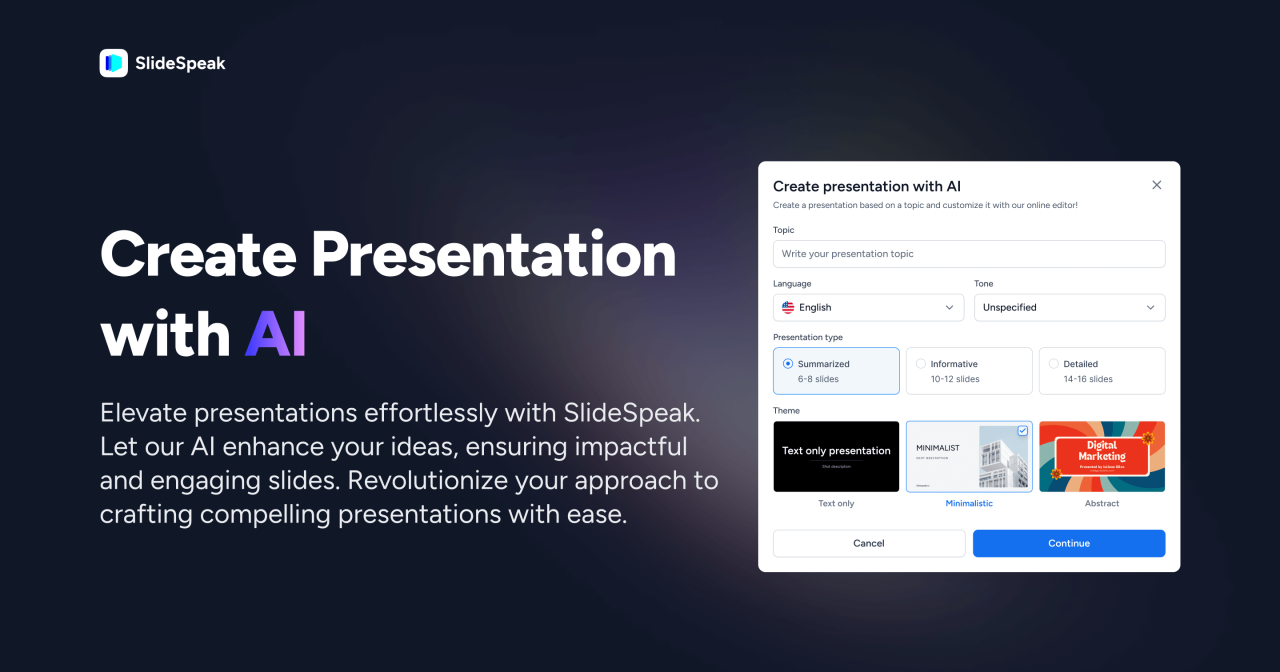
Effective presentation slides not only rely on visual appeal but also on the clarity and impact of the content. Leveraging AI to generate precise text and organize data can significantly improve the overall quality and professionalism of your slides. This section explores how AI tools assist in drafting succinct, impactful narratives and transforming raw data into compelling visual formats that resonate with audiences.AI-powered writing assistants enable users to craft concise, clear, and persuasive text snippets tailored to specific contexts.
These tools analyze the core message and suggest language that emphasizes key points, reduces verbosity, and maintains a professional tone. Utilizing AI for content refinement ensures that every word on your slides serves a purpose, enhances understanding, and drives engagement.Organizing complex data and statistics into visually appealing formats is crucial for effective communication. AI tools can interpret numerical data and automatically generate charts, infographics, and tables that are easy to comprehend.
Proper data visualization not only clarifies trends and comparisons but also helps retain audience attention and improve retention.
Drafting Concise, Impactful Text
AI-driven writing platforms, such as language models and content generators, assist in creating succinct summaries, key messages, and call-to-action statements. By inputting detailed notes or raw content, users receive polished paragraphs that highlight essential information without unnecessary detail. This streamlining ensures that each slide communicates effectively within limited space, facilitating better audience understanding.
“Concise content enhances clarity, making your message more memorable and impactful.”
For example, AI can transform a lengthy paragraph describing a market trend into a brief statement, like: “Market growth accelerated by 15% in Q2, driven by increased consumer demand and technological innovation.” Such precision captures attention and conveys critical insights efficiently.
Organizing Data and Statistics Visually
Presenting data visually simplifies complex information and makes patterns more accessible. AI tools can automatically select appropriate visualization formats based on data type and context, such as bar charts, pie diagrams, or heat maps. They can also optimize color schemes, labels, and annotations to ensure clarity and aesthetic appeal.
To maximize effectiveness, data should be organized into categories that facilitate comparison and highlight key insights. AI can assist in grouping related data points and identifying the most relevant metrics for your message.
| Data Category | Value | Visual Indicator | Notes |
|---|---|---|---|
| Revenue Growth | 25% | Upward arrow icon in green | Compared to previous quarter |
| Customer Satisfaction | 4.5 out of 5 | Smiley face icon in yellow | Based on survey data from 1,000 respondents |
| Market Share | 35% | Pie chart segment highlighted | Leading competitor holds 20% |
| Product Adoption Rate | 60% | Progress bar in blue | Increased from 45% in the previous year |
Ensuring Consistency and Professionalism in Slides
Creating visually cohesive and professional slides is essential to delivering impactful presentations. Leveraging AI tools effectively can streamline the process of maintaining uniformity in style, font, and color schemes across all slides. Proper consistency not only enhances aesthetic appeal but also reinforces branding and improves audience engagement. AI-driven solutions facilitate automated checks and adjustments, saving time and reducing manual errors, ultimately elevating the overall quality of your presentation.Maintaining consistency and professionalism involves systematic procedures that utilize AI’s capabilities for style verification, brand adherence, and slide refinement.
Employing these strategies ensures that your slides communicate credibility and are visually aligned with your organizational standards or personal branding.
Using AI to Check and Maintain Style, Font, and Color Consistency
Ensuring a uniform style throughout your presentation is crucial for a polished look. AI tools can automatically analyze slide elements to verify consistency in fonts, colors, and formatting. These tools scan each slide, compare styles against predefined templates or style guides, and flag any discrepancies. For example, an AI-powered presentation software can detect if a different font or color scheme has been used unexpectedly and suggest or automatically apply the correct style.To implement this, establish a style guide specifying preferred fonts, color palettes, and formatting rules.
AI applications then cross-reference each slide against these standards, providing real-time feedback or automatic corrections. This approach minimizes manual oversight and guarantees that every slide adheres to your branding or stylistic preferences.
Automating the Application of Branding Guidelines with AI
AI simplifies the enforcement of branding guidelines by automating the application of logos, color schemes, and visual elements across all slides. By integrating branding assets into AI-driven slide templates, the tool can automatically overlay logos, adjust color schemes, and align visual components according to predefined corporate standards.For instance, AI can automatically insert the official logo in consistent positions on each slide, adapt color tones to match brand colors, and ensure font choices align with branding policies.
This automation not only accelerates the creation process but also eliminates inconsistencies that often occur with manual adjustments, ensuring every presentation maintains a professional and unified brand identity.
Reviewing and Refining Slides Using AI-Powered Feedback Tools
AI-powered feedback tools facilitate comprehensive review processes that enhance slide professionalism. These tools analyze your presentation for aspects such as layout balance, visual hierarchy, readability, and overall coherence. They can identify issues like overcrowded slides, inconsistent alignments, or poor contrast, providing actionable suggestions for improvement.Implementing AI review processes involves uploading your slides into platforms that offer real-time analysis or feedback.
These tools generate reports highlighting areas needing adjustment, suggest alternative layouts, or recommend better visual elements. Incorporating this feedback ensures that your presentation not only meets aesthetic standards but also effectively communicates your message with clarity and professionalism.
Utilizing AI for consistency and professionalism transforms the slide creation process into a more precise, efficient, and high-quality endeavor. Automated checks and adjustments ensure your presentation maintains a cohesive, branded, and polished appearance, ultimately delivering a more compelling message to your audience.
Finalizing and Exporting AI-Enhanced Presentations
Once the slides have been generated and refined with AI assistance, the finalization and export process become crucial steps to ensure the presentation is polished, professional, and ready for delivery. Proper review, editing, and choice of export formats help maintain visual quality and audience engagement. Incorporating multimedia elements seamlessly enhances the overall impact, making the presentation more interactive and memorable.
Effective finalization involves meticulous review and editing to correct any remaining inconsistencies, enhance clarity, and ensure that the visual and textual content aligns with the intended message. Choosing the appropriate export formats preserves the design integrity and compatibility across different platforms and devices. Additionally, embedding interactive or multimedia elements generated by AI adds an engaging dynamic that can elevate the presentation’s effectiveness, especially in virtual or hybrid settings.
Review, Edit, and Finalize Slides with AI Assistance
Reviewing and editing AI-enhanced slides is a vital step to ensure accuracy, coherence, and professionalism. AI tools can assist in identifying grammatical errors, inconsistencies, or design flaws, but human oversight remains essential for contextual relevance and nuanced adjustments.
- Conduct a comprehensive review of each slide, verifying the accuracy of data, clarity of message, and visual consistency.
- Utilize AI-powered editing features to suggest improvements in language, layout, and visual elements.
- Adjust font sizes, color schemes, and alignments to enhance readability and aesthetic appeal, leveraging AI recommendations.
- Ensure that transitions and animations are smooth and do not distract from the core content.
- Solicit feedback from colleagues or stakeholders to gather diverse perspectives and identify areas needing refinement.
Exporting Slides into Various Formats
Choosing the right export format is essential for maintaining the presentation’s visual fidelity and ensuring compatibility with different platforms or devices. AI tools often support multiple export options, allowing for versatile dissemination.
- PDF Format: Ideal for static, non-editable presentations that retain design consistency across devices. Perfect for sharing finalized versions or printing handouts.
- PowerPoint (PPTX): Suitable when further editing or customization is required by recipients, preserving animations and multimedia elements.
- Video Formats (MP4, MOV): Useful for creating self-running presentations or sharing via video platforms. AI can help synchronize animations and narration into seamless videos.
- HTML or Web-Based Formats: Facilitate online sharing and embedding in websites, with AI-generated interactive features preserved.
“Maintaining high resolution and quality during export ensures that images, graphics, and text remain sharp and professional, regardless of the chosen format.”
Embedding Interactive and Multimedia Elements
Embedding interactive or multimedia components generated or enhanced by AI adds value to the presentation by engaging the audience actively. These elements include videos, audio clips, quizzes, or clickable links that can be seamlessly integrated during the finalization phase.
- Ensure that multimedia files are optimized for size and quality to prevent lag or loading issues during presentation.
- Embed videos and audio clips directly into slides, leveraging AI tools that can generate or enhance multimedia content for relevance and professionalism.
- Incorporate interactive elements such as clickable hotspots, embedded quizzes, or hyperlinks to external resources, making the presentation more engaging and informative.
- Test all embedded elements thoroughly in the export format to confirm proper functionality across different devices and software.
- Use AI to suggest suitable placement and sizing of multimedia components, ensuring they complement the textual and visual content without cluttering the slides.
Final Summary
In summary, leveraging AI for creating professional slides offers a multitude of benefits from design efficiency to consistency and visual impact. As you implement these methods, you’ll find your presentation workflow becoming more streamlined, producing polished slides that effectively communicate your message. Embrace AI as a valuable partner in elevating your presentation quality and delivering memorable experiences to your audience.