Learning how to generate data visuals with AI opens new horizons for efficiently transforming complex datasets into compelling visual narratives. This approach leverages advanced artificial intelligence to streamline the creation of insightful and visually appealing representations of data, offering a significant advantage over traditional manual methods.
The process involves selecting suitable AI-powered visualization tools, preparing and transforming raw data appropriately, and designing customized visuals that effectively communicate key insights. By understanding these steps, users can enhance their data storytelling capabilities and produce impactful visualizations with ease.
Overview of AI-Based Data Visualization
Artificial Intelligence (AI) has revolutionized the way data is transformed into visual insights, enabling more efficient, accurate, and dynamic representations of complex datasets. AI-based data visualization refers to the use of machine learning algorithms and intelligent systems to automatically generate, optimize, and enhance visual representations of data, often with minimal human intervention. This approach leverages advanced computational capabilities to interpret large volumes of information, identify patterns, and present them visually in ways that are both informative and engaging.
Compared to traditional data visualization techniques, which often rely on manual design and static charts, AI-driven solutions offer numerous benefits. They can handle vast datasets that would be cumbersome for manual analysis, adapt visualizations dynamically based on the data context, and uncover hidden insights that might escape human observation. Furthermore, AI tools often include features such as automated chart selection, real-time updates, and personalized visualizations tailored to specific user needs, making data analysis more accessible and impactful across various industries.
Key Features of AI Visualization Tools
When selecting AI-based data visualization tools, certain features are essential to maximize their utility and effectiveness. These tools should incorporate capabilities that streamline the visualization process, enhance interpretability, and support decision-making. The following key features are crucial:
| Feature | Description |
|---|---|
| Automated Chart Selection | AI algorithms analyze the dataset and automatically recommend the most suitable chart types, such as bar graphs, scatter plots, or heatmaps, based on data characteristics and user goals. |
| Data Pattern Recognition | Advanced AI models identify trends, anomalies, correlations, and clusters within data, transforming raw information into meaningful visual summaries that highlight critical insights. |
| Real-Time Data Processing | Many AI visualization tools support live data feeds, enabling dynamic updates and interactive dashboards that reflect the latest information, crucial for timely decision-making. |
| Personalization and Adaptability | Tools should allow customization of visualizations to suit specific user preferences or industries, adapting layouts, color schemes, and interaction modes accordingly. |
| Natural Language Generation | Some AI tools incorporate natural language processing to generate descriptive summaries and explanations of visual data, making insights more accessible to non-experts. |
| Integration Capabilities | Effective AI visualization solutions seamlessly connect with existing data sources and analytics platforms, facilitating a smooth workflow and comprehensive analysis. |
“AI-driven data visualization not only accelerates the process of insight discovery but also enhances the clarity and depth of understanding, empowering data-driven decisions across diverse sectors.”
Popular AI Tools and Platforms for Data Visualization
The landscape of AI-powered data visualization tools has expanded rapidly in recent years, offering professionals a diverse array of options to transform raw data into insightful, interactive visuals. These platforms leverage artificial intelligence to automate complex tasks, enhance accuracy, and enable real-time data analysis, making it easier for users to uncover patterns and derive actionable insights efficiently.
When selecting an AI-driven visualization platform, it is crucial to consider features such as automation capabilities, ease of integration, scalability, and customization options. Compatibility with existing data sources and systems also plays a vital role in ensuring seamless workflows. Below, we examine some of the leading tools available today, comparing their core features, pricing models, and compatibility to aid in informed decision-making.
Leading AI-Driven Data Visualization Software Options
The following table provides an overview of prominent AI-based data visualization tools, highlighting key features, pricing strategies, and system compatibility to assist organizations and data professionals in choosing the most suitable platform for their needs.
| Tool | Features | Pricing | Compatibility & Integration |
|---|---|---|---|
| Tableau with Einstein Analytics | AI-powered predictive analytics, interactive dashboards, natural language processing (NLP) | Subscription-based, starting at $70/month per user; custom enterprise pricing available | Integrates with cloud services (AWS, Azure, Google Cloud), databases, and Excel; supports REST APIs |
| Power BI with Azure Synapse | Automated insights, machine learning integration, real-time data streaming | Free tier available; Premium licenses from $20/user/month | Seamless integration with Azure Data Lake, SQL Server, and various third-party data sources |
| Qlik Sense with AI Augmentation | Self-service visualization, AI-driven insights, natural language search | Subscription plans start at $30/month per user; enterprise licenses vary | Supports multiple data sources including SAP, Oracle, and Hadoop; API connectivity enabled |
| Google Data Studio with AutoML | Custom ML model integration, collaborative dashboards, automated reporting | Free of charge | Connects easily with Google Cloud services, BigQuery, and external data via connectors |
Each of these tools offers distinct advantages tailored to different organizational needs. For instance, Tableau with Einstein Analytics excels in combining advanced predictive capabilities with intuitive visualizations, making it ideal for enterprise-level analytics. Power BI, integrated deeply with Microsoft Azure, is favored for its affordability and seamless compatibility with existing Microsoft ecosystems. Qlik Sense emphasizes user-driven exploration and AI augmentation, supporting diverse data sources and enabling quick insights.
Google Data Studio, complemented by AutoML, provides a cost-effective option with strong capabilities for integrating machine learning models directly into visual reports.
Effective data visualization with AI depends heavily on the compatibility and integration capabilities of the chosen tools, ensuring that data from various sources can be easily processed and visualized in a unified environment.
Data Preparation for AI Visualization

Effective data visualization with AI relies heavily on the quality and organization of the raw data. Proper preparation ensures that datasets are clean, consistent, and formatted appropriately for AI algorithms to interpret accurately. This foundational step significantly impacts the accuracy, clarity, and usefulness of generated visuals, making it essential to follow systematic procedures for data cleaning and transformation.
Preparing data involves multiple processes that transform raw, often unstructured or messy information into structured formats suitable for AI-driven visualization tools. These steps include addressing inconsistencies, handling missing values, normalizing datasets, and converting data into formats that facilitate seamless processing by AI models. Proper preprocessing not only enhances model performance but also ensures that visual insights derived are valid and reliable.
Procedures for Cleaning and Organizing Raw Data
Raw data typically contains errors, inconsistencies, and irrelevant information that must be addressed before visualization. The following procedures help streamline data quality:
- Removing duplicates: Ensuring each data entry is unique to prevent skewed visualizations.
- Handling missing values: Filling gaps using methods like mean, median, mode, or more advanced imputation techniques, or removing incomplete records if appropriate.
- Correcting inaccuracies: Verifying data points against reliable sources and rectifying anomalies or typos.
- Standardizing formats: Ensuring consistency in date formats, units of measurement, and categorical labels.
- Filtering irrelevant data: Eliminating data points or features that do not contribute to the visualization objectives.
Transforming Datasets into Suitable Formats for AI Algorithms
Transforming datasets involves converting cleaned data into formats that align with the requirements of AI visualization tools. Proper transformation enhances algorithm efficiency and interpretability:
- Normalization and scaling: Adjusting numerical data to a common scale to prevent features with larger ranges from dominating the analysis. For example, scaling sales figures to a 0-1 range.
- Encoding categorical variables: Converting categories into numerical formats that AI models can process, such as one-hot encoding or label encoding. For instance, transforming “Region” categories into binary vectors.
- Feature engineering: Creating new features or aggregating existing ones to highlight relevant patterns. An example includes deriving a “Customer Lifetime Value” from purchase history and demographics.
- Reshaping data structures: Adjusting data tables into formats like pivot tables or long vs. wide formats to facilitate specific visualizations or model inputs.
- Data partitioning: Splitting datasets into training, validation, and testing sets to ensure robust model development and evaluation, especially in cases involving predictive insights.
Example: When preparing sales data for AI visualization, one might normalize sales figures, encode categorical data such as product categories, and create new features like seasonal indicators to better illustrate trends and patterns.
Designing Visuals with AI Assistance
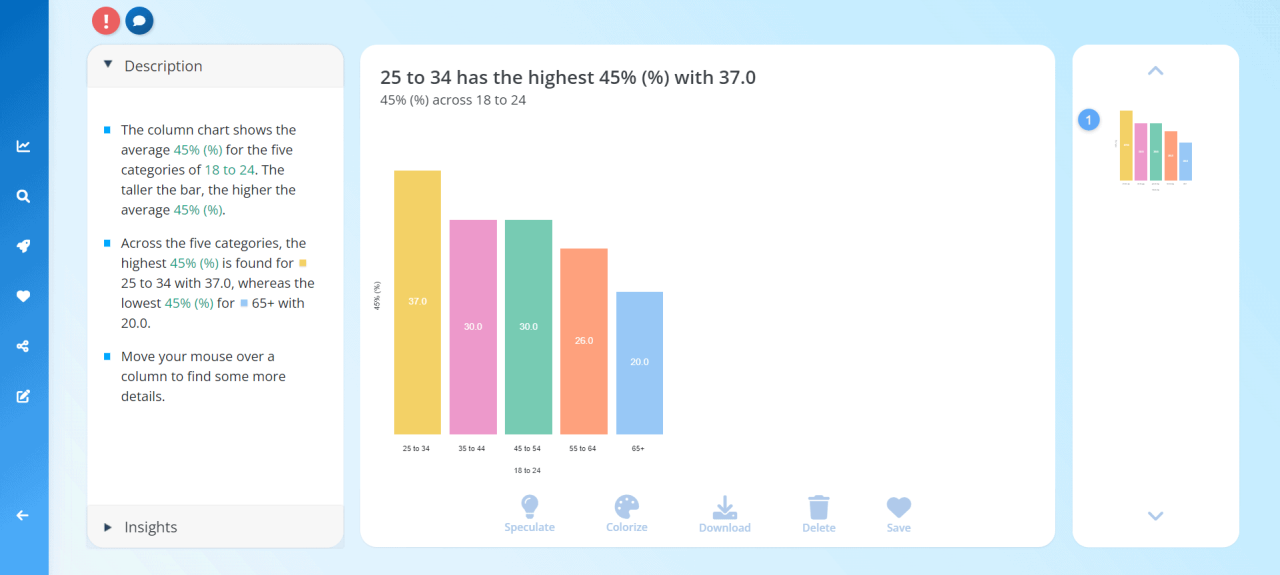
Designing compelling and informative visuals is a crucial aspect of effective data communication. Leveraging AI tools streamlines this process by offering intelligent suggestions, automating complex tasks, and enhancing the overall quality of visualizations. This segment explores a systematic approach to designing visuals with AI support, ensuring that data is represented accurately and engagingly.
Utilizing AI-based visualization tools involves selecting appropriate chart types, customizing visual elements, and validating the clarity of the presentation. These steps help users create visuals that not only convey insights effectively but also adapt dynamically to evolving data sets, making data storytelling more impactful.
Step-by-Step Procedures for Designing Visuals with AI Tools
- Import and Analyze Data: Begin by uploading the prepared dataset into the AI visualization platform. Most tools offer data analysis features that identify key patterns, distributions, and trends, guiding the visualization process.
- Choose Visualization Objectives: Define what insights or narratives the visual should communicate. AI tools can suggest visualization types based on the data’s nature and the intended message.
- Select Suitable Chart Types: Use AI recommendations to select the most appropriate visualization form. For example, trend data might suggest line charts, while categorical distributions may fit bar charts.
- Customize Visual Elements: Adjust colors, labels, axes, and annotations through AI-driven interfaces that optimize clarity and aesthetics. Some tools auto-suggest enhancements for better readability and engagement.
- Validate and Refine: Preview the visual with the AI’s suggestions and make manual adjustments if necessary. Ensure the visualization accurately reflects the data and effectively communicates the key insights.
Organizing Procedures for Selecting Visualization Types Based on Data
The selection of visualization type depends on the data’s structure, type, and the insights aimed to be highlighted. AI tools analyze these factors to recommend the best format, simplifying the decision-making process for users.
For instance, when data involves temporal sequences, AI might recommend line or area charts. In contrast, for comparing categories, bar or column charts are suitable. For complex relationships, scatter plots or bubble charts may be suggested. The AI assesses data dimensions, distribution, and relationships to optimize visualization choices, ensuring each visual effectively supports data interpretation.
Sample HTML Table Structures Illustrating Different Chart Types
Below are example HTML tables with up to four responsive columns, representing various chart types to aid in selecting the most suitable visualization for specific data scenarios.
| Chart Type | Description | Use Case | Sample Data |
|---|---|---|---|
| Line Chart | Displays trends over time or ordered categories. | Tracking sales growth across months or years. |
|
| Bar Chart | Compares quantities across different categories. | Analyzing regional sales performance. |
|
| Scatter Plot | Illustrates relationships between two numerical variables. | Correlation between advertising spend and sales. |
|
| Pie Chart | Shows proportions or percentage parts of a whole. | Market share distribution among competitors. |
|
Customizing and Enhancing AI-Generated Visuals
Once AI systems generate initial data visualizations, refining these outputs to maximize clarity and visual impact is essential. Customization allows users to tailor visuals to specific audiences, emphasize key insights, and ensure the presentation aligns with the intended message. By applying various modification techniques, users can transform basic AI-generated images into compelling, informative graphics that facilitate better understanding and engagement.
Enhancing AI-generated visuals involves a combination of technical adjustments and stylistic improvements. These modifications not only improve aesthetic appeal but also serve to highlight critical data points, clarify complex relationships, and facilitate interactive exploration. Employing strategic enhancements ensures that the visualizations effectively communicate insights and support data-driven decision-making.
Modifying Visuals for Clarity and Impact
Effective customization begins with evaluating the visual for areas that may benefit from adjustments to improve readability and interpretability. Common modifications include adjusting color schemes, resizing elements, and refining data representation methods. These changes help reduce visual clutter, emphasize important trends, and make the visualization more accessible to diverse audiences.
Techniques to improve clarity and impact encompass:
- Color Optimization: Utilizing contrasting colors to differentiate data categories, or applying colorblind-friendly palettes to ensure accessibility.
- Scaling and Resizing: Increasing font sizes for labels and annotations, or enlarging key data points to draw attention.
- Simplification: Removing unnecessary gridlines or background elements that detract from core insights.
- Focus Areas: Applying zoom or cropping features to highlight specific segments of the data.
Adding Annotations, Labels, and Interactivity
Annotations and labels significantly enhance a visualization’s interpretability by providing context, explanations, or references directly within the graphic. Interactivity, on the other hand, allows users to explore data dynamically, fostering deeper understanding and engagement. Combining these elements transforms static visuals into comprehensive tools for analysis and communication.
Procedures for integrating these features include:
- Inserting Annotations and Labels: Use the AI platform’s editing interface to add descriptive texts, data labels, or arrows pointing to specific data points. For example, annotating peaks in a sales trend chart to denote significant events or product launches.
- Implementing Interactivity: Incorporate features such as hover-over tooltips, clickable segments, or filters that enable users to explore different data layers. Platforms like Tableau or Power BI facilitate embedding such interactive elements seamlessly.
- Balancing Detail and Clarity: Ensure annotations are concise and avoid cluttering the visualization. Use tooltips for supplementary information, reserving the main visual for core data representations.
Exporting Visuals into Various Formats for Reports
Sharing AI-enhanced visuals effectively requires exporting them into formats suitable for reports, presentations, or online dissemination. Proper export ensures that the visual quality remains intact and that the visuals are compatible with different platforms and media.
Standard procedures for exporting include:
| Format | Description | Best Use Cases |
|---|---|---|
| PNG or JPEG | Raster image formats suitable for reports and presentations with high visual quality. Ideal for static images embedded in documents or slides. | |
| SVG | Scalable Vector Graphics format that preserves quality at any size. Suitable for high-resolution displays and editable vector graphics. | |
| Preserves visual fidelity and layout, suitable for sharing complete reports or detailed visuals with annotations. | ||
| Interactive web formats | HTML or embedded visualization tools for online dashboards or interactive reports, allowing users to engage with data directly. |
When exporting, consider the intended medium and audience, ensuring that the visual retains clarity and interactivity (if applicable). Many AI visualization tools offer direct export options, streamlining this process and maintaining visual integrity across formats.
Case Studies and Practical Examples
Real-world applications of AI-powered data visualization demonstrate the transformative potential of these tools across diverse industries. Analyzing successful implementations provides valuable insights into best practices, effective approaches, and measurable outcomes. Such examples serve as practical guides for organizations aiming to leverage AI to enhance their data storytelling, decision-making, and stakeholder engagement.
Below are detailed case studies that exemplify how AI-driven visualization solutions address specific business challenges, employ innovative techniques, and deliver impactful results. Each case highlights the problem context, the AI approach utilized, and the tangible outcomes achieved, offering actionable insights for replicating similar successes in different settings.
Customer Behavior Analysis in Retail
This case involves a large retail chain seeking to understand customer purchasing patterns to optimize inventory and marketing strategies. The challenge was to analyze vast amounts of transaction data, including purchase history, demographics, and online engagement metrics.
- Problem Statement: Difficulty identifying meaningful customer segments and predicting future buying behaviors based on large, complex datasets.
- AI Approach: Implemented an AI-driven data visualization platform that employed machine learning algorithms for clustering and trend detection. The system automatically generated interactive visual dashboards that depicted customer segments, purchase timelines, and correlation patterns.
- Results: The visualization enabled marketing teams to tailor campaigns more precisely, resulting in a 15% increase in promotional effectiveness and a 10% uplift in sales within targeted segments. The intuitive visuals also improved cross-functional collaboration by making complex data accessible to non-technical stakeholders.
This example illustrates how integrating AI with advanced visualization fosters a deeper understanding of customer behaviors, leading to strategic advantages in competitive markets.
Financial Market Trend Prediction
In the finance sector, a hedge fund aimed to enhance its market prediction models by integrating real-time data visualization. The goal was to identify early signals of market shifts using vast streams of financial news, economic indicators, and social media sentiment.
- Problem Statement: Traditional analysis methods were too slow for the rapid dynamics of financial markets, and static charts failed to capture emerging patterns effectively.
- AI Approach: Deployed an AI-enabled visualization platform that processed real-time data feeds, employing natural language processing (NLP) to analyze news and social media sentiment. The system automatically generated animated trend graphs, heatmaps, and sentiment charts that updated continuously, highlighting potential investment opportunities.
- Results: The fund achieved a 20% improvement in response time to market signals, with enhanced accuracy in predicting short-term market movements. The visual dashboards facilitated quicker decision-making and risk assessment, resulting in more informed trading strategies.
This case exemplifies how AI-powered visualizations can transform raw data streams into actionable insights in fast-paced environments like financial trading.
Healthcare Data Monitoring and Visualization
A healthcare organization aimed to improve patient outcome tracking and operational efficiency through better data visualization. The challenge was to interpret complex clinical data, patient histories, and operational metrics to identify trends and areas for intervention.
- Problem Statement: Conventional reports were often static and lacked interactivity, limiting clinicians and administrators from exploring data dynamically and uncovering hidden patterns.
- AI Approach: Utilized an AI-driven visualization tool that integrated electronic health records (EHR) data with predictive analytics. The system generated interactive dashboards with heatmaps of patient flow, risk stratification charts, and predictive models highlighting potential health crises before they occurred.
- Results: The organization saw a 25% reduction in hospital readmissions and improved resource allocation efficiency. Clinicians could quickly interpret patient data, aiding in personalized treatment planning and proactive care management.
Through this example, it’s evident how AI-enhanced visualization supports better clinical insights and operational decisions, ultimately improving patient care quality.
Best Practices and Tips for Effective AI Data Visuals

Creating impactful and insightful data visuals with AI requires careful planning and adherence to proven strategies. Well-designed visuals not only communicate data clearly but also engage viewers, enabling faster and more accurate decision-making. Applying best practices ensures that AI-generated visuals serve their intended purpose effectively while minimizing misunderstandings or misinterpretations.AI-driven visualization tools offer tremendous potential but also pose risks if not used properly.
Overlooking key design principles or neglecting data integrity can lead to misleading stories or cluttered visuals. By establishing clear guidelines and leveraging best practices, users can maximize the value derived from AI-generated visualizations, transforming complex datasets into compelling narratives that resonate with diverse audiences.
Key Recommendations for Designing Clear and Insightful Visuals
Effective data visuals should prioritize clarity, accuracy, and audience engagement. To achieve this, it is essential to focus on the following principles:
- Maintain Simplicity: Use minimalistic design elements to avoid overwhelming viewers. Focus on essential data points that support the core message.
- Choose Appropriate Visual Types: Select charts or graphs that best represent the data’s nature—bar charts for comparisons, line graphs for trends, pie charts for proportions, etc. AI tools can assist in recommending suitable formats based on the dataset characteristics.
- Ensure Data Accuracy and Integrity: Verify data sources and preprocessing steps to prevent inaccuracies. Use AI validation features to check for anomalies or inconsistencies before visualization.
- Use Consistent Color Schemes: Apply colors thoughtfully to encode information meaningfully, avoiding excessive or contrasting colors that may cause confusion. AI can suggest palettes optimized for accessibility and clarity.
- Label Clearly and Precisely: Provide descriptive titles, axis labels, and data labels that enhance understanding. Avoid abbreviations unless widely recognized, and ensure font sizes are readable.
Guidelines for Avoiding Common Pitfalls in AI-Driven Visualization
While AI tools automate much of the visualization process, users must remain vigilant to avoid mistakes that could distort data interpretation or diminish credibility.
Common pitfalls include overloading visuals with too much information, selecting inappropriate chart types, or misrepresenting data through misleading scales or omitted context. AI-generated visuals may sometimes emphasize visual aesthetics over clarity, so human oversight remains critical. Additionally, bias in data inputs or algorithmic misinterpretations can lead to inaccurate representations, which compromise analysis and decision-making.
Consistently review AI outputs for contextual relevance and accuracy before sharing or presenting data visuals. Regular validation helps maintain integrity and trustworthiness in data storytelling.
Tips for Optimizing Visual Storytelling with AI
Effective visual storytelling requires not only visually appealing graphics but also a coherent narrative that guides the audience through data insights seamlessly.
- Prioritize Key Messages: Highlight the most significant data points or trends, ensuring they stand out within the visual. Use annotations or callouts effectively, with AI suggesting optimal placements.
- Leverage Interactivity: Incorporate interactive elements such as filters or drill-down options that AI platforms support to allow viewers to explore data layers according to their interests.
- Maintain Consistent Design Language: Use uniform fonts, colors, and layout styles across visuals to create a cohesive story. AI tools often offer templates that promote consistency.
- Test Visuals with Target Audiences: Gather feedback on clarity and engagement from representative users. AI-powered analytics can measure how viewers interact with visuals, providing data to refine storytelling strategies.
- Integrate Context and Narratives: Complement visuals with descriptive text or voice-over explanations. AI can assist in generating concise summaries or insights that enhance comprehension.
Adhering to these best practices ensures that AI-generated data visuals are not only aesthetically pleasing but also strategically effective in conveying complex information succinctly and accurately. By combining human judgment with AI capabilities, data storytellers can craft visuals that truly inform and inspire action.
Summary

In conclusion, mastering how to generate data visuals with AI empowers users to create dynamic, accurate, and engaging visual representations that facilitate better decision-making. By exploring the best tools, preparation techniques, and design strategies, one can unlock the full potential of AI-driven data visualization for diverse applications.