Discover innovative strategies to craft captivating and effective presentation slides through the integration of artificial intelligence. This approach not only streamlines the design process but also unlocks new creative possibilities, empowering designers to produce visually compelling narratives effortlessly. Embarking on this journey reveals how AI can elevate your design projects to new heights of originality and professionalism.
In this guide, we explore foundational principles of slide design, compare traditional and AI-assisted techniques, and demonstrate how AI tools can generate unique content, enhance visual elements, and refine your presentations. By leveraging AI-driven solutions, creators can efficiently develop engaging slides that communicate their ideas with clarity and impact, making their projects stand out in a competitive landscape.
Understanding the Foundations of Creative Slides for Design Projects
Creating compelling slides for design projects requires a deep understanding of core design principles and the effective use of available tools. With the rise of artificial intelligence, designers now have innovative methods to craft visually engaging presentations that communicate ideas clearly and creatively. This segment explores the essential principles that underpin effective slide design, the common challenges faced by creators, and a comparative overview of traditional versus AI-assisted techniques.Designing slides for creative projects hinges on principles that ensure clarity, visual appeal, and audience engagement.
These principles serve as the foundation for effective communication through visual storytelling. Recognizing these fundamentals helps designers produce slides that are not only aesthetically pleasing but also functionally effective, facilitating the conveyance of complex ideas succinctly.Common challenges in creating slides for creative work often stem from balancing creativity with clarity, managing time constraints, and maintaining consistency across visual elements. Creative projects demand originality, which can sometimes conflict with the need for straightforward communication.
Additionally, designers may struggle with selecting appropriate visuals or layouts that enhance rather than distract from the core message. Technical limitations and the learning curve associated with sophisticated design tools can further impede the process.
Principles of Effective Slide Design in Creative Projects
Effective slide design is rooted in several core principles that ensure the presentation is engaging and impactful. These include:
- Clarity and Simplicity: Slides should communicate ideas without overwhelming the audience. Avoid clutter and focus on key messages.
- Visual Hierarchy: Use size, color, and positioning to guide viewers’ attention to the most important elements.
- Consistency: Maintain uniformity in fonts, colors, and layout styles throughout the presentation to create a cohesive look.
- Balance and Alignment: Ensure visual components are well-aligned and balanced to create harmony and readability.
- Use of Visuals: Incorporate relevant images, icons, and graphics to complement the text and help illustrate concepts.
- Color Theory: Apply color schemes that evoke the desired emotional response and enhance readability.
These principles collectively contribute to slides that are not only visually appealing but also effective in storytelling and information delivery.
Challenges Faced in Creative Slide Creation
Understanding the hurdles encountered during slide development enables better preparation and strategy formulation. Key challenges include:
- Maintaining Originality: Striking a balance between innovative design and clear messaging can be difficult, especially under tight deadlines.
- Selecting Appropriate Visuals: Finding images and graphics that align perfectly with the theme and message requires time and discernment.
- Consistency Across Slides: Ensuring uniformity in style, color palette, and layout necessitates careful planning and attention to detail.
- Technical Limitations: Constraints of presentation software or hardware can restrict creative expression or functionality.
- Time Management: Producing high-quality slides within limited timeframes challenges even experienced designers.
Overcoming these challenges involves strategic planning, effective use of tools, and leveraging innovative techniques to streamline the creative process.
Traditional vs. AI-Assisted Slide Creation Techniques
The evolution of slide creation methods has brought about significant differences between traditional approaches and AI-assisted techniques. Understanding these differences helps designers choose the appropriate tools for their projects.Traditional slide design relies heavily on manual efforts, requiring designers to:
- Sketch initial concepts by hand or on screen using presentation software.
- Manually select and edit visuals, layouts, and color schemes.
- Apply design principles through experience and iteration, often involving multiple revisions.
- Spend considerable time aligning and formatting elements to achieve visual harmony.
While traditional approaches foster creativity through hands-on experimentation, they can be time-consuming and dependent on the designer’s skill level.In contrast, AI-assisted slide creation utilizes advanced algorithms and machine learning to streamline design processes. Key features include:
- Automatic generation of layouts based on content input, ensuring optimal visual hierarchy.
- Smart suggestions for color schemes, fonts, and imagery aligned with project themes.
- Rapid prototyping and iteration capabilities, allowing quick exploration of multiple design options.
- Content analysis to identify key messages, simplifying the process of structuring slides.
AI tools significantly reduce manual effort, enhance creativity by offering innovative suggestions, and improve consistency across slides. However, they may require initial familiarization and oversight to ensure the generated designs align with the project’s goals and style.
Leveraging AI Tools for Generating Creative Slide Content
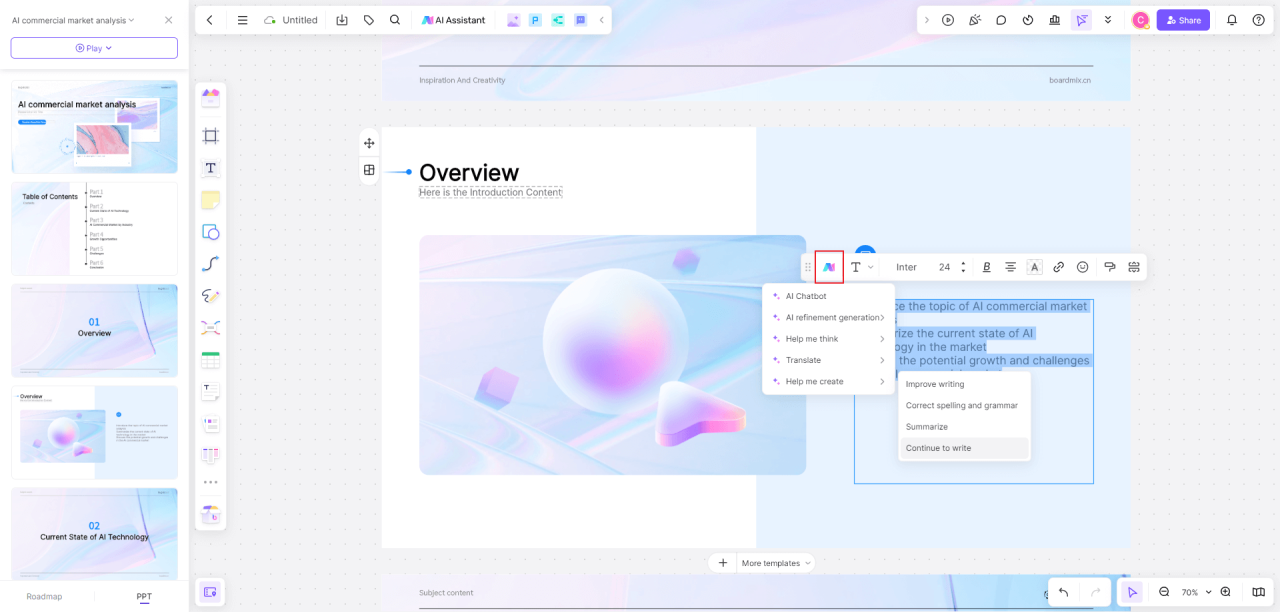
Utilizing AI tools to craft innovative and compelling slide content has revolutionized the way designers approach presentation creation. These tools facilitate idea generation, visual conception, and content enhancement, enabling the production of original and engaging slides efficiently. Integrating AI into the creative process not only accelerates workflow but also unlocks new levels of originality that might be challenging to achieve manually.
By harnessing the power of AI, designers can explore a vast array of themes, layouts, and visual styles. This approach encourages experimentation and helps in developing unique narratives aligned with the project’s objectives. From brainstorming fresh ideas to generating distinctive visual concepts, AI serves as a valuable assistant in elevating the quality and creativity of slide designs for diverse projects.
Using AI to Brainstorm Innovative Slide Ideas and Themes
AI-driven brainstorming involves leveraging advanced algorithms and natural language processing to generate a spectrum of ideas that align with your project goals. By inputting specific s, themes, or objectives, AI tools can suggest relevant concepts, titles, and thematic directions that might not be immediately apparent through traditional methods.
For instance, inputting a brief about a sustainability project into an AI idea generator can produce themes such as “Green Energy Innovations,” “Eco-Friendly Urban Development,” or “Circular Economy Models.” These suggestions provide a rich foundation for developing engaging slides that resonate with the intended audience and reinforce the project’s message.
Step-by-Step Process to Generate Unique Visual Concepts Using AI
- Define the core theme or message you want your slide to communicate, ensuring clarity of purpose for the AI tool.
- Select an AI-powered visual design platform, such as DALL·E, Midjourney, or Canva’s AI features, which offer generative image capabilities.
- Input descriptive prompts that include specific details about the desired visual style, color palette, and elements. For example, “futuristic cityscape with green rooftops and solar panels in vibrant colors.”
- Allow the AI to process the prompt and generate multiple visual options, reviewing each for relevance and originality.
- Refine the prompts based on initial outputs to better align with your vision, iterating until a suitable visual concept emerges.
- Integrate the AI-generated visuals into your slides, adjusting layouts and combining them with text and other graphical elements for a cohesive presentation.
AI Features Tailored for Slide Design Tasks
Incorporating AI features specifically designed for slide design enhances efficiency and creativity. The following table illustrates various AI capabilities and their applications in the context of slide creation:
| AI Feature | Application in Slide Design | Benefit |
|---|---|---|
| AI-Powered Content Generation | Creating compelling headlines, summaries, and bullet points based on input topics | Speeds up content development and ensures clarity and impact |
| Automated Visual Suggestions | Recommending relevant images, icons, or infographics matching the slide theme | Enhances visual appeal and maintains thematic consistency |
| Design Layout Optimization | Suggesting balanced and aesthetic slide layouts based on content structure | Ensures professional and visually engaging slides without manual trial-and-error |
| Color Palette and Style Recommendations | Offering color schemes and style options aligned with branding or mood | Creates harmonious and visually appealing slides automatically |
| Speech-to-Text and Voice Commands | Converting spoken ideas into slide content or navigation commands during editing | Streamlines the editing process and facilitates quick updates |
Designing Visually Engaging Slides with AI Assistance
Creating visually appealing slides that effectively communicate your message is a crucial aspect of successful design projects. With the integration of AI tools, designers can now streamline the process of developing engaging visuals, ensuring consistency and creativity across presentations. Leveraging AI not only accelerates the design workflow but also opens new avenues for innovative slide aesthetics that captivate audiences.
AI assistance in slide design encompasses various elements, from establishing harmonious color schemes to selecting and customizing imagery, as well as enhancing key design components like typography and layout. By understanding and utilizing these AI-powered capabilities, designers can craft slides that are both aesthetically pleasing and highly functional.
Creating Harmonious Color Schemes with AI-Powered Palette Generators
Color harmony is fundamental to creating visually cohesive slides. AI-powered palette generators analyze color theory principles and existing visual elements to suggest optimal color combinations. These tools consider factors like contrast, complementarity, and color psychology to produce palettes that enhance readability and aesthetic appeal.
To effectively use AI palette generators, input your base color, brand colors, or mood preferences. The AI then offers a selection of complementary, analogous, or triadic color schemes. For example, an AI tool might suggest a soothing palette of pastel blues and greens for a health-related presentation, ensuring that the colors evoke calmness and trust. Customization options allow fine-tuning of suggested palettes, adjusting saturation and brightness to match your specific design goals.
Employing such AI-generated palettes ensures consistency across slides, improves visual hierarchy, and maintains a professional look without the need for extensive manual color exploration.
Selecting and Customizing AI-Suggested Imagery for Slides
Imagery plays a vital role in engaging your audience and illustrating key concepts. AI-powered image generators and suggesters facilitate the selection process by providing relevant visuals aligned with your slide content. These tools analyze your text or s to recommend images that enhance storytelling and reinforce your message.
Once suggested, images can be customized directly within AI platforms or through editing software. Adjustments may include cropping, filtering, or recoloring to better match your slide’s color scheme and overall style. For example, an AI-generated photo of a city skyline can be personalized by changing the lighting to create a dawn or dusk effect, setting a specific mood for your presentation.
Using AI to select and modify imagery ensures that visuals are not only relevant but also tailored to your unique design context, improving overall slide coherence and visual impact.
Design Elements Enhanced by AI
AI significantly enhances various design elements, enabling more refined and effective slides. Below are key components optimized through AI assistance:
- Typography: AI tools recommend font pairings based on readability, style harmony, and audience engagement. They can suggest font sizes, weights, and spacing adjustments to improve clarity.
- Layout: AI-driven layout generators analyze content structure and suggest optimal placement of text, images, and other elements, ensuring balanced and visually appealing slides.
- Icons and Graphics: AI can generate or recommend icons and vector graphics that match your theme, saving time and enhancing visual consistency.
- Animation and Transition Effects: AI suggests subtle and impactful animation styles that complement the content without overwhelming viewers, maintaining a professional tone.
- Consistency and Branding: AI ensures uniform application of color schemes, fonts, and styles throughout the presentation, reinforcing brand identity and aesthetic coherence.
Integrating AI into slide design not only streamlines workflows but also elevates the quality of visual communication, making your presentations more engaging and impactful.
Incorporating AI-Generated Graphics and Visual Assets

Utilizing AI tools to generate custom graphics, icons, illustrations, and infographics can significantly enhance the visual appeal and clarity of your design slides. These AI capabilities empower designers to create unique, context-specific assets that align seamlessly with the overall theme and message of the presentation, saving valuable time and resources.
AI-driven visual asset generation enables the creation of diverse and high-quality graphics tailored to various design themes—ranging from professional business presentations to creative portfolios. This approach ensures consistency in style, color schemes, and visual language, while also fostering innovation through style experimentation and rapid prototyping.
Generating Custom Icons, Illustrations, and Infographics with AI Tools
AI tools leverage advanced algorithms, machine learning models, and vast datasets to produce bespoke visual assets that meet specific project requirements. These tools typically accept input parameters such as s, style preferences, color palettes, and thematic cues to generate relevant graphics efficiently.
For example, a designer working on a healthcare project can input terms like “medical icons,” “hospital illustrations,” or “healthcare infographics,” prompting the AI to create tailored visual elements. These assets can then be refined or customized further using editing tools, ensuring they perfectly match the project’s tone and branding.
Popular AI-based platforms for generating visual assets include DALL·E, Midjourney, and Canva’s AI features. These platforms enable the creation of highly personalized illustrations, icons, and infographics that can be integrated directly into slide designs, enhancing visual storytelling and audience engagement.
Examples of AI-Produced Visual Assets for Various Design Themes
AI-generated visual assets can be adapted for a broad spectrum of design themes, demonstrating flexibility and creative potential:
- Corporate and Business: Minimalist icons, professional infographics, and sleek illustrations suitable for finance, marketing, or management presentations.
- Educational: Engaging diagrams, step-by-step process visuals, and thematic illustrations for classrooms or training modules.
- Creative/Artistic: Abstract backgrounds, artistic icons, and experimental infographics that elevate artistic portfolios or design showcases.
- Technology: Futuristic icons, circuit diagrams, or AI-themed illustrations that suit tech startups, software demos, or innovation reports.
AI Visual Generation Platforms and Their Capabilities
Choosing the right platform depends on the specific asset types, customization needs, and budget constraints.
| Platform | Asset Types | Core Capabilities | Notable Features | Pricing Model |
|---|---|---|---|---|
| DALL·E 2 | Images, illustrations, concept art | Text-to-image generation with high detail and creative outputs | Advanced prompt understanding, style transfer, inpainting | Pay-per-use, subscription plans |
| Midjourney | High-quality art, concept visuals, abstract images | Creative and artistic style generation from prompts | Community-driven, iterative refinement, style customization | Subscription-based |
| Canva’s AI Tools | Icons, backgrounds, infographics, illustrations | Template-driven design combined with AI-assisted asset creation | User-friendly interface, extensive template library, brand kits | Freemium with subscription options |
| Runway ML | Images, animations, video assets | Versatile AI models for image synthesis, editing, and animation | Integration with creative workflows, customization options | Subscription-based, tiered plans |
Structuring Content for Maximum Impact in Creative Slides
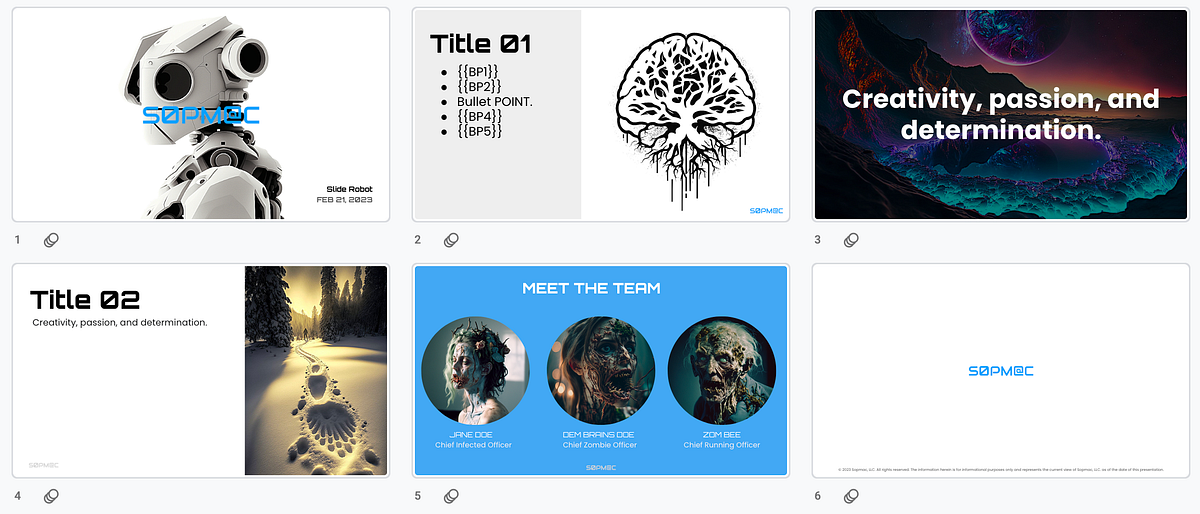
Effectively organizing content is essential for delivering compelling and memorable presentations. When crafting slides for design projects, a well-structured approach ensures that your message resonates clearly with your audience while maintaining visual engagement. Leveraging AI tools to assist in this process can significantly enhance the clarity, coherence, and overall impact of your slides, making complex information more accessible and persuasive.
Proper content structuring involves not only arranging information logically but also utilizing AI-driven suggestions to optimize hierarchies, formats, and multimedia integration. This systematic approach ensures that every slide contributes cohesively to the overarching narrative of the project, allowing viewers to follow the story seamlessly and absorb key insights effectively.
Organizing Textual Information with AI-Suggested Hierarchies and Formats
AI tools excel at analyzing large amounts of text and proposing ideal hierarchical structures that highlight the most critical points. These tools can recommend the use of headings, subheadings, bullet points, and numbered lists to create a clear visual hierarchy. For instance, AI can suggest breaking down complex concepts into digestible sections, ensuring that primary ideas are prominent and secondary details are accessible without overwhelming the viewer.
Employing AI-powered formatting recommendations helps maintain consistency across slides, improving readability and aesthetic appeal. Examples include adjusting font sizes based on importance, emphasizing key phrases with bold or italics, and aligning content for visual balance. Such suggestions streamline the editing process and guarantee that the textual content aligns with the overall design language.
Embedding Multimedia and Interactive Elements via AI-Driven Recommendations
Integrating multimedia elements like videos, audio clips, and interactive buttons enriches the storytelling aspect of your slides. AI-driven recommendations can identify optimal points within the content to embed these elements, enhancing user engagement without causing distraction. For example, AI can suggest inserting a short animation to illustrate a concept or embedding an interactive chart to allow viewers to explore data dynamically.
Furthermore, AI can recommend the most suitable multimedia formats and placement to ensure consistency and accessibility. It can also suggest captions, alternative text, and other accessibility features, making your presentation more inclusive. By leveraging AI insights, designers can create a multi-layered experience that caters to diverse learning preferences and retains audience interest.
Aligning Content Structure with the Overall Project Narrative
A cohesive narrative is fundamental for impactful slides, requiring each element to support the central story or message. AI tools can analyze the entire project scope and suggest logical sequencing of slides to maintain narrative flow. This involves aligning the hierarchy of information with the storyline, ensuring that each slide naturally transitions to the next while reinforcing key themes.
To achieve this, AI can generate suggested Artikels based on the core objectives of the project. It can also identify gaps or redundancies in the content, prompting adjustments that sharpen the focus. Additionally, AI can assist in designing transitions and visual cues that guide the audience smoothly through the story, creating a unified and compelling presentation
Enhancing Creativity and Uniqueness with AI-Driven Brainstorming

In the realm of creative slide design for projects, fostering originality and innovative ideas is essential. AI-driven brainstorming offers powerful avenues to unlock unconventional concepts and push creative boundaries. This approach enables designers to explore a vast landscape of ideas rapidly, facilitating the development of compelling and distinctive presentation stories that stand out.
By leveraging AI tools to stimulate brainstorming sessions, designers can tap into a wellspring of unique perspectives and unexpected connections. These tools serve as collaborative partners, helping to rapidly generate diverse ideas and refine them into cohesive narratives. The key to maximizing these benefits lies in understanding how to effectively incorporate AI suggestions into the storytelling process, ensuring that each slide embodies creativity and purpose.
Strategies for Using AI to Explore Unconventional Ideas and Creative Concepts
Applying AI for creative exploration involves setting parameters that encourage out-of-the-box thinking. Initiate brainstorming sessions by inputting broad themes or abstract prompts into AI tools, prompting the generation of unconventional ideas that challenge traditional perspectives. For example, instruct AI to suggest metaphorical visuals or alternative narrative angles for a given topic, fostering innovation.
Utilize AI to propose diverse interpretations and alternative approaches that may not surface through traditional brainstorming. Encourage iterative interactions with the AI, refining prompts based on initial outputs to delve deeper into niche ideas. This process often results in surprising connections, metaphors, or visuals that can offer fresh angles for your slides, making your presentation more engaging and memorable.
Compiling AI-Generated Suggestions into Cohesive Slide Stories
The next step involves synthesizing the multitude of AI-generated ideas into a unified narrative flow. Begin by categorizing suggestions based on themes or relevance, then identify common threads or contrasting elements to build a compelling storyline. Use storyboarding techniques to arrange these ideas logically, ensuring each slide transitions smoothly into the next, maintaining audience engagement.
Implement a critical review process, selecting the most innovative and impactful suggestions while discarding less relevant ones. Enrich your slides with AI-suggested visuals, metaphors, or data points, integrating them seamlessly with your original content. The goal is to craft a slide story that is both creatively rich and cohesive, leveraging AI-generated insights to enhance the overall effectiveness of your presentation.
AI Tools for Creative Brainstorming and Idea Refinement
The following AI tools are highly effective for elevating your creative brainstorming sessions and refining your ideas into impactful slides:
- Kami: Facilitates open-ended idea generation, thematic exploration, and narrative development through conversational prompts.
- DALL·E: Generates unique visual concepts and illustrations based on descriptive prompts, useful for creating unconventional graphics.
- Miro with AI integrations: Supports collaborative mind mapping and idea clustering with AI-powered suggestions for connecting disparate concepts.
- Ideanote: Focuses on idea collection and refinement, offering AI-driven prioritization and feedback mechanisms.
- Canva’s Text to Image: Enables quick creation of custom visuals aligned with abstract or innovative ideas, enhancing slide aesthetics.
- DeepDream Generator: Produces surreal and highly creative images that can serve as unique visual assets, sparking further inspiration.
Incorporating these tools into your workflow can dramatically expand your creative potential, providing diverse perspectives and visual assets that drive unique slide storytelling. The synergy between human intuition and AI’s generative capabilities fosters an environment ripe for groundbreaking ideas, setting your projects apart with originality and innovation.
Finalizing and Refining Slides Using AI Feedback
Creating high-quality presentation slides involves not only initial design and content generation but also a meticulous refinement process. Leveraging AI tools to review and enhance slides ensures that the final product is polished, professional, and impactful. By implementing AI-driven feedback mechanisms, designers can identify areas for improvement and make data-informed adjustments, streamlining the revision process significantly. This stage is crucial for transforming a good draft into an exceptional presentation that effectively communicates the intended message and engages the audience.AI-powered review systems analyze slides for various aspects, including visual consistency, readability, and overall coherence.
These tools can detect issues such as cluttered layouts, poor contrast, or inconsistent fonts, providing actionable suggestions for correction. Integrating AI feedback iteratively allows creators to refine their slides efficiently, saving time while maintaining high standards of quality. Moreover, AI can simulate audience reactions or highlight potential points of confusion, enabling designers to anticipate and address possible objections or misunderstandings before final delivery.
Methods to Utilize AI for Iterative Review and Visual Refinement
Effective refinement begins with establishing a structured process that harnesses AI capabilities at each stage of review. Initially, upload the draft slides into an AI-driven review platform that evaluates visual harmony, alignment, and design consistency. The AI then generates a detailed report highlighting areas needing improvement, such as misaligned elements or overly dense text sections.To optimize the refinement process, consider adopting the following methods:
- Automated Visual Analysis: Use AI tools that analyze slide layout for balance, whitespace distribution, and visual hierarchy, ensuring that key messages stand out effectively.
- Content Clarity and Readability Checks: Leverage AI to assess text legibility, font size appropriateness, and concise language, enhancing overall comprehension.
- Color and Contrast Optimization: Utilize AI suggestions to improve color schemes, ensuring accessibility for viewers with visual impairments and maintaining visual appeal.
- Feedback Loop Integration: Incorporate iterative cycles where AI feedback informs manual adjustments, followed by re-evaluation, to progressively enhance the slide quality.
Incorporating AI-Suggested Improvements into Slide Presentations
Once AI tools provide feedback, the next step involves systematically integrating these suggestions into your slides. This process begins with reviewing AI-generated reports or annotations, prioritizing changes based on their potential impact on clarity and professionalism. For instance, if AI suggests reducing clutter by removing unnecessary elements, designers should evaluate and implement these modifications to streamline the visual flow.Tools often offer direct editing features or recommendations, enabling seamless updates.
It is beneficial to document changes to track improvements over successive iterations. When incorporating AI-suggested enhancements, consider the following strategies:
- Consistency Checks: Ensure that adjustments align with the overall design language, maintaining uniform fonts, colors, and styles across all slides.
- Content Re-organization: Use AI insights to reorder slides or segments for better narrative flow and logical progression.
- Visual Enhancements: Apply recommended graphic adjustments, such as resizing or repositioning visual assets, to improve clarity and engagement.
- Validation and Final Review: Conduct a final AI-assisted review to confirm that all suggested improvements are effectively incorporated and that no new issues have been introduced.
Step-by-Step Guide to Polishing Slides for Professional Delivery
Achieving a polished, professional presentation involves a systematic approach that combines AI feedback with meticulous manual review. The following steps provide a structured pathway:
- Initial Draft Review: Upload your preliminary slides into AI review tools to identify fundamental issues related to design consistency, readability, and visual balance.
- Implement AI Recommendations: Make targeted adjustments based on AI suggestions, focusing on high-impact areas such as layout, color schemes, and content clarity.
- Iterative Refinement: Repeat the review process, refining slides in multiple cycles until the AI feedback indicates optimal visual and content quality.
- Manual Fine-Tuning: Complement AI insights with human judgment—review for nuances that AI might miss, such as tone, storytelling flow, and contextual appropriateness.
- Consistency and Cohesion Check: Ensure all slides adhere to a unified style guide, verifying fonts, alignments, and visual themes.
- Final Validation: Use AI tools to perform a comprehensive final review, checking for any overlooked issues or inconsistencies.
- Preparation for Delivery: Optimize file sizes, ensure compatibility across presentation devices, and prepare supplementary materials if necessary for a seamless presentation experience.
Utilizing AI feedback in this structured manner ensures that each slide is meticulously refined, resulting in a presentation that is not only visually appealing but also capable of delivering a compelling message with professionalism and confidence.
End of Discussion
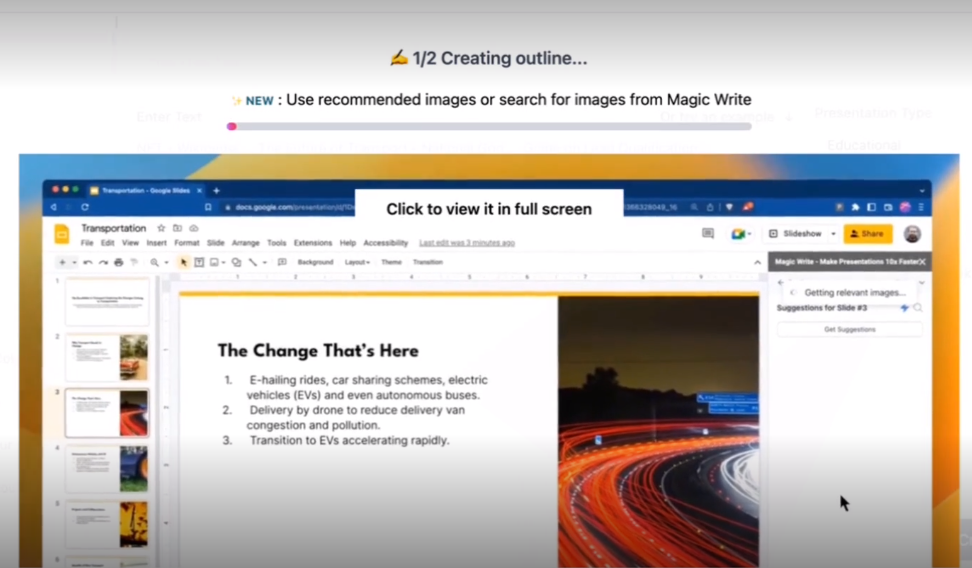
In conclusion, integrating AI into the slide creation process offers a powerful way to amplify creativity, improve efficiency, and produce visually stunning presentations. As technology continues to evolve, embracing these tools will become essential for delivering impactful design projects that resonate with audiences and leave a lasting impression.