Understanding how to generate educational infographics with AI opens new horizons for creating visually compelling and informative content. Leveraging AI technologies allows educators and content creators to streamline the design process, ensuring that complex information is presented clearly and engagingly. This approach not only enhances the visual appeal but also promotes better comprehension and retention among learners.
From selecting the right AI tools to designing customizable visual elements and integrating data seamlessly, mastering this process empowers educators to produce high-quality educational visuals efficiently. Incorporating accessibility features and adhering to ethical standards further ensures that the infographics are impactful and trustworthy, making AI an invaluable asset in modern educational content creation.
Understanding the Role of AI in Educational Infographics

Artificial Intelligence (AI) has become a transformative force in various domains, including educational content creation. When it comes to designing educational infographics, AI offers innovative solutions that enhance visual appeal, accuracy, and efficiency. Incorporating AI into infographic development not only streamlines the creative process but also elevates the quality of information delivery, making complex concepts more accessible and engaging for learners of all ages.
By leveraging AI tools, educators and content creators can automate labor-intensive tasks, generate tailored visual elements, and analyze audience engagement to refine their designs. This synergy between human expertise and AI technology fosters the creation of compelling, data-driven educational infographics that resonate with diverse audiences and support effective learning experiences.
AI Assistance in Designing Educational Infographics
The integration of AI in infographic design primarily focuses on automating repetitive tasks, enhancing visual elements, and ensuring data accuracy. AI-driven design tools can generate layouts based on content type, recommend color schemes aligned with educational themes, and optimize the placement of textual and visual components for clarity and impact. These capabilities allow creators to focus more on content quality while AI handles the aesthetic and structural aspects.
Furthermore, AI can analyze large datasets to extract relevant information, identify trending topics, and suggest the most effective ways to visualize data. For instance, AI algorithms can recognize patterns within educational data, such as student performance metrics, and translate these into intuitive charts or graphs that facilitate better understanding. This level of automation and insight significantly accelerates the infographic creation process and improves the final product’s effectiveness.
Suitable AI Tools for Creating Educational Content
Numerous AI-powered tools are available to support the development of educational infographics, each offering unique functionalities tailored to different needs. These tools typically provide user-friendly interfaces that require minimal technical expertise while delivering powerful design capabilities.
For example:
- Canva with AI features: Offers intelligent template suggestions, automatic color palette generation, and image enhancement features that help craft visually appealing infographics quickly.
- Piktochart: Utilizes AI to recommend data visualizations based on uploaded datasets and offers drag-and-drop functionalities for easy customization.
- Visme: Incorporates AI-driven design insights, enabling users to create engaging visuals with minimal effort, along with data automation for real-time updates.
- Tableau: An advanced data visualization tool that uses AI algorithms to analyze complex data sets and suggest the most effective visual representations for educational purposes.
- DesignScape by Adobe: Employs AI to recommend layout adjustments, font pairings, and imagery that align with the educational content’s tone and purpose.
Advantages of Integrating AI into Infographic Development
Incorporating AI into the creation of educational infographics provides multiple advantages that enhance both efficiency and quality. These benefits include:
- Time-Saving Automation: AI streamlines repetitive design tasks, freeing up creators to focus on content accuracy and pedagogical effectiveness.
- Enhanced Visual Appeal: AI tools suggest harmonious color schemes, font pairings, and layout arrangements that improve overall aesthetic quality.
- Data Accuracy and Visualization: AI can analyze raw data, identify key insights, and generate precise visual representations, ensuring the information conveyed is reliable and easy to understand.
- Personalization and Adaptability: AI enables the customization of infographics to suit specific audience needs, such as targeted age groups or educational levels, by analyzing user preferences and engagement patterns.
- Innovation and Creativity: AI offers novel design ideas and visual concepts that might not emerge through manual processes, fostering more innovative educational materials.
Integrating AI into educational infographic creation transforms the process into a more efficient, creative, and data-driven endeavor, ultimately supporting more effective and engaging learning experiences.
Planning Effective Educational Infographics with AI
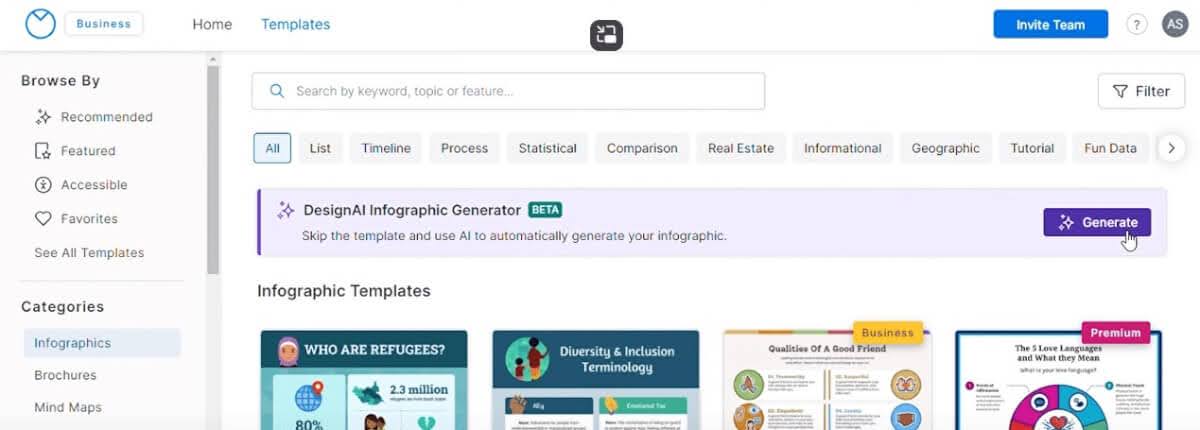
Designing impactful educational infographics requires strategic planning, especially when leveraging AI tools to streamline the process. Effective planning ensures that complex information is conveyed clearly and engagingly, maximizing the educational value for viewers. Integrating AI into this phase enables educators and designers to identify suitable topics, organize key data points, and develop a structured workflow that enhances creativity and accuracy.
By understanding the steps involved in planning with AI assistance, users can produce visually compelling and informative infographics that cater to diverse learning needs. This approach not only saves time but also ensures consistency, relevance, and clarity throughout the design process, ultimately leading to more effective educational communication.
Identifying Suitable Educational Topics for Infographics
Choosing the right topics is fundamental to creating educational infographics that resonate with the target audience. AI-powered analysis tools can assist in identifying trending and relevant subjects across various disciplines, ensuring content remains current and engaging. When selecting topics, consider the audience’s age, educational level, and specific learning objectives.
Examples of suitable topics include complex scientific processes, historical timelines, statistical comparisons, and step-by-step tutorials. AI can analyze user queries, search trends, and curriculum standards to recommend impactful subjects that align with educational goals.
Organizing Key Information and Data Points
Structured organization of information enhances the clarity and impact of infographics. Using AI-driven data analysis and summarization tools can help identify the most critical points to include, reducing information overload and focusing on core messages. Proper organization involves categorizing data logically, prioritizing key insights, and establishing relationships between concepts.
Tools such as natural language processing (NLP) can extract essential data from large datasets or texts, transforming them into concise summaries. Organizing data into thematic sections or visual hierarchies allows viewers to grasp information quickly and retain it effectively.
Structured Workflow for Incorporating AI in Planning
Implementing a systematic workflow for AI-assisted planning ensures efficiency and consistency in infographic development. The following steps Artikel an effective process:
- Topic Selection: Utilize AI algorithms analyzing recent trends, curriculum standards, and search data to recommend relevant educational topics.
- Data Collection and Analysis: Gather data from reliable sources and employ AI tools for summarization and key point extraction to identify crucial information.
- Content Structuring: Use AI-based visualization planning tools to organize data hierarchically, establishing relationships and flow for the infographic.
- Design Drafting: Leverage AI-powered design templates and suggestions to create initial layouts that align with content structure and educational objectives.
- Review and Optimization: Apply AI feedback mechanisms to evaluate clarity, balance, and visual appeal, refining the infographic accordingly.
Integrating AI into the planning process enhances accuracy, accelerates decision-making, and fosters innovative approaches to educational content presentation.
Selecting and Using AI Tools for Infographic Creation
Choosing the appropriate AI-powered graphic design tools is essential for creating compelling and educational infographics efficiently. When integrated correctly, these tools can significantly streamline the design process, enhance visual appeal, and ensure the accurate presentation of information. Understanding the capabilities and features of various platforms enables educators and content creators to optimize their workflow and produce high-quality visual content tailored to their audiences.
Effective utilization of AI tools involves not only selecting the right platform but also knowing how to input educational content in a way that maximizes output quality. Proper formatting, clear instructions, and understanding the strengths of each tool contribute to producing visually appealing and informative infographics. Comparing different AI platforms based on usability, customization options, and output quality helps users make informed decisions aligned with their specific needs and technical proficiency.
Popular AI-Powered Graphic Design Platforms and Their Features
Several AI-driven graphic design platforms have emerged as leaders in the creation of educational infographics, each offering unique features to facilitate the design process. These platforms leverage artificial intelligence to automate layout decisions, suggest design elements, and enhance visual consistency, making them accessible even for users with limited design experience.
| Platform | Key Features | Strengths | Limitations |
|---|---|---|---|
| Canva with Magic Write and AI elements | Intuitive drag-and-drop interface, AI-based design suggestions, extensive template library, real-time collaboration | User-friendly, versatile, suitable for beginners and professionals | Some advanced customization options require a subscription |
| Visme | AI-powered data visualization, interactive elements, customizable templates, branding tools | Excellent for data-driven educational infographics | Learning curve for advanced features |
| Piktochart | Smart templates, AI-based image recommendations, simple editing tools | Specialized in infographics and presentations | Limited free options for high-resolution outputs |
| Crello (now VistaCreate) | AI-driven design suggestions, vast template collection, animation features | Good for engaging, animated infographics | Less advanced data visualization capabilities |
| Adobe Express (formerly Adobe Spark) | AI-enhanced layout suggestions, extensive asset libraries, integration with Adobe Creative Cloud | Professional-grade design options with seamless integration | Requires Adobe account and subscription for full features |
Inputting Educational Content for Optimal Output
To leverage AI tools effectively, it is crucial to input educational content in a clear and structured manner. Organizing information logically, using concise language, and providing sufficient context help AI algorithms generate accurate and engaging visual representations. When entering data, consider breaking down complex concepts into digestible segments, which can be transformed into visual elements such as charts, icons, and callouts.
Many AI design platforms support the import of text, data, and images from various sources, including spreadsheets and text documents. Proper formatting—such as using headings, bullet points, and clear labels—guides the AI in understanding the hierarchy and importance of information, leading to a more coherent and visually appealing infographic. Additionally, providing specific instructions, such as preferred color schemes or design styles, can refine the output to better match the educational tone and audience.
Comparison of AI Tools Based on Usability, Customization, and Output Quality
Assessing AI-powered infographic platforms involves examining three critical aspects: usability, customization options, and output quality. This comparison helps users identify the platform best suited to their skill level and project requirements.
- Usability: Platforms like Canva and Crello are known for their intuitive interfaces, making them suitable for users without prior design experience. Visme and Adobe Express, while slightly more complex, offer guided workflows that support learning curves and advanced features.
- Customization: Adobe Express and Canva provide extensive customization options, including branding elements, font choices, and layout adjustments. Visme excels in data visualization customization, allowing detailed control over charts and interactive components.
- Output Quality: Professional-grade outputs are often associated with Adobe Express and Canva, which produce high-resolution images suitable for print or large displays. Platforms like Piktochart and Crello generate high-quality digital infographics, but may have limitations in advanced design features.
Ultimately, selecting the right AI tool involves balancing ease of use, the desired level of customization, and the quality of the final output. Evaluating these aspects ensures the creation of effective educational infographics that communicate complex ideas clearly and attractively.
Designing Visual Elements Using AI
Creating compelling and visually appealing educational infographics relies heavily on the effective design of visual elements such as icons, charts, and illustrations. Leveraging AI-driven tools streamlines this process, enabling educators and content creators to generate high-quality visuals efficiently. Incorporating AI assistance not only accelerates production but also enhances the aesthetic and communicative power of educational materials.
By utilizing AI, designers can automate the generation of diverse visual assets, customize styles seamlessly, and ensure consistency across the infographic. This approach facilitates the crafting of visually coherent and engaging content that effectively captures learners’ attention and reinforces key concepts.
Generating Icons, Charts, and Illustrations with AI Assistance
AI-powered design tools leverage machine learning algorithms to create a wide array of visual elements tailored to educational content. Icons, charts, and illustrations can be generated automatically based on descriptive prompts, making it easier to produce visuals that align with the topic at hand.
For example, platforms like DALL·E or Midjourney can generate custom illustrations by interpreting textual descriptions, allowing creators to obtain unique images that match their specific educational themes. Similarly, AI tools such as Canva’s AI features or Adobe Express offer vast libraries of icons and vector graphics that can be customized or generated anew based on user input.
When designing charts, AI-driven software like Tableau or Microsoft Power BI can automate the creation of data visualizations, selecting the most appropriate chart types—such as bar, pie, or line charts—and adjusting parameters to best represent the data accurately and clearly.
Automated Customization of Colors, Styles, and Layouts
Consistent and visually harmonious design is crucial for effective educational infographics. AI tools facilitate automatic customization of colors, styles, and layouts, ensuring that the visual presentation remains cohesive and aesthetically pleasing without extensive manual adjustments.
Many AI-based design platforms include features that analyze existing color schemes for harmony and suggest complementary palettes, often based on color theory principles. For example, Adobe Creative Cloud’s AI features can suggest style adjustments that match a specific branding or thematic palette, enhancing visual consistency across multiple infographics.
Layout optimization is another area where AI excels. Tools can analyze content structure and automatically suggest or implement optimal arrangements, balancing text, visuals, and whitespace for maximum clarity and engagement. This ensures that information is easily digestible and that the infographic’s flow guides the viewer naturally through the material.
Maintaining Visual Consistency and Clarity
Achieving visual consistency and clarity is fundamental to effective learning materials. AI assists in maintaining uniform style elements, such as icon sets, color schemes, and font choices, across all visual components of an infographic.
Implementing style templates and style transfer algorithms allows designers to apply a set of predefined visual parameters uniformly. This approach minimizes inconsistencies and enhances the professional appearance of the infographic. Additionally, AI can detect visual clutter or overload, recommending simplifications or adjustments to improve clarity.
Best practices include establishing a style guide at the outset, utilizing AI tools to enforce these standards throughout the design process, and regularly previewing the infographic at different scales or devices to ensure that visual elements remain legible and cohesive. Ensuring that icons and illustrations are simple yet distinctive enhances comprehension, especially for complex data or concepts.
Integrating Data and Text into Infographics with AI

Creating engaging and informative educational infographics requires the effective integration of large datasets and textual information. AI-powered tools facilitate this process by streamlining data input, organization, and content generation, ensuring that complex information is presented clearly and visually appealingly. This section explores how to leverage AI for importing extensive data, generating concise summaries and annotations, and combining these elements into cohesive infographic layouts.Accurate and well-organized data input is fundamental to producing meaningful educational infographics.
AI tools often support various data formats such as CSV, Excel, or JSON, allowing users to upload comprehensive datasets efficiently. Once uploaded, AI algorithms can automatically categorize, filter, and clean data, reducing manual effort and minimizing errors. For example, educators might upload student performance data across multiple assessments, and AI can parse this data to identify trends or highlight key statistics.
Proper organization involves structuring data into logical segments, such as demographic information, test scores, or attendance rates, which can later be visually represented.AI can also process large datasets to generate summarized text, labels, and annotations that enhance the infographic’s clarity. Using natural language processing (NLP) techniques, AI models interpret data points and produce concise descriptions, such as summarizing a significant increase in literacy rates over a decade or annotating specific data clusters for emphasis.
These summaries provide contextual information without overwhelming the viewer. Labels are automatically assigned to chart axes, data categories, or specific points of interest, ensuring consistency and accuracy throughout the infographic. Annotations can include explanations, insights, or references that make complex data accessible to a broad audience.Combining AI-generated content into cohesive infographic layouts involves strategic placement and visual design principles. AI design platforms often offer drag-and-drop interfaces that allow users to incorporate processed data, summaries, and labels seamlessly.
Additionally, AI can suggest optimal layout arrangements based on content hierarchy, ensuring that the most critical information captures attention. For example, AI can arrange data visualizations alongside textual annotations, balancing graphics with text to create an engaging narrative. During this process, designers should verify that AI suggestions maintain logical flow, use color schemes effectively, and adhere to accessibility standards, resulting in a professional and educational visual presentation.
Enhancing Accessibility and Engagement through AI
In the realm of educational infographics, ensuring accessibility and fostering engagement are crucial to reaching diverse audiences effectively. Artificial Intelligence offers a suite of advanced features that enable creators to design content that is both inclusive and captivating. By leveraging AI-driven tools, educators and designers can create infographics that not only communicate information clearly but also invite interaction and participation from users across different backgrounds and abilities.
Implementing AI technologies to improve accessibility and engagement involves applying intelligent design principles, personalized user experiences, and multimedia integration. These approaches enhance comprehension, retention, and motivation, ultimately making educational content more impactful and widely accessible.
Designing Infographics for Accessibility
Accessibility-focused design ensures that infographics are usable by individuals with diverse needs, including those with visual, auditory, or cognitive impairments. AI contributes significantly to this goal through features that automate and optimize accessible design elements.
- Automatic color contrast adjustments: AI tools analyze color schemes to ensure sufficient contrast, aiding users with visual impairments or color blindness. For example, AI can recommend color palettes that meet WCAG (Web Content Accessibility Guidelines) standards, making visuals easier to perceive.
- Text readability enhancement: AI-powered text analysis can identify font sizes and styles that maximize clarity. Dynamic resizing and font selection algorithms adapt content for various screen sizes and user preferences.
- Alternative text generation: AI can generate descriptive alt text for images and icons automatically, ensuring that screen readers can convey visual information effectively to users with visual impairments.
- Speech and language support: Incorporating AI-powered voice synthesis and translation makes infographics accessible to non-native speakers and individuals with reading disabilities, broadening reach.
Optimizing Readability and Interactivity with AI Features
AI tools enhance both the clarity and interactivity of educational infographics, transforming passive visual content into engaging learning experiences. These features include:
- Adaptive content presentation: AI algorithms analyze user interaction patterns to modify infographic complexity and focus areas. For instance, simplified versions can be presented to learners requiring additional support, while more advanced content is shown to proficient users.
- Interactive elements powered by AI: Embedding AI-driven hotspots, clickable data points, or quizzes increases user engagement. These elements respond to user input, providing immediate feedback and personalized learning pathways.
- Real-time data updates: AI can integrate live data feeds, ensuring infographics remain current. This is particularly valuable in fields like health or environmental education, where information evolves rapidly.
- Natural language processing (NLP): AI-driven NLP features enable users to interact verbally with infographics, asking questions or requesting clarifications, thereby creating an immersive educational environment.
Incorporating Multimedia Elements Generated by AI for Engagement
Multimedia integration is a powerful method to elevate the appeal and effectiveness of educational infographics. AI facilitates the creation and deployment of multimedia components, such as images, audio, and videos, tailored to enhance learning experiences.
- AI-generated visuals and illustrations: Utilizing generative adversarial networks (GANs) and other AI models, creators can produce relevant graphics, infographics, or animations on demand. For example, AI can generate custom diagrams illustrating complex scientific concepts, making them easier to understand.
- Automated narration and audio descriptions: AI speech synthesis tools can produce high-quality voiceovers that explain infographic content, catering to auditory learners and visually impaired users. These are customizable to different languages and accents.
- Video snippets and interactive media: AI can embed short explainer videos or interactive simulations within infographics, providing dynamic demonstrations or experiments that engage users more deeply.
- Personalized multimedia experiences: Combining AI analytics with multimedia generation enables infographics to adapt content based on user interactions, preferences, or learning pace, fostering a more personalized and engaging educational journey.
Exporting and Refining AI-Generated Educational Infographics
After successfully generating educational infographics with AI, the subsequent critical phase involves exporting the visuals in suitable formats and meticulously refining them to ensure clarity, accuracy, and visual appeal. Proper exporting guarantees that the infographics are accessible across various platforms, while manual refinement enhances the overall quality and effectiveness of the educational content.
This process not only preserves the integrity of the AI-generated design but also allows for personalized adjustments that meet specific educational standards. It ensures that the final product is polished, engaging, and ready for dissemination to learners or stakeholders.
Exporting Infographics in Various Formats Using AI Tools
AI-powered infographic creation tools often support multiple export formats to facilitate diverse usage scenarios, including digital distribution and print. Selecting the right format is essential for maintaining image quality and compatibility with different platforms. Common formats include:
- PNG (Portable Network Graphics): Ideal for high-quality images with transparent backgrounds, suitable for web use and presentations.
- JPEG/JPG (Joint Photographic Experts Group): Suitable for photographs and colorful visuals, offering good compression with acceptable quality for online sharing.
- PDF (Portable Document Format): Best for printing or sharing static, multi-page infographics while preserving formatting and layout integrity.
- SVG (Scalable Vector Graphics): A vector format optimal for maintaining quality at various sizes, especially for infographics that may require scaling.
Many AI tools provide straightforward options to export directly to these formats, often with customizable resolution settings. Ensuring the correct export settings helps prevent pixelation or distortion, especially when preparing infographics for print or high-resolution displays.
Reviewing, Editing, and Improving AI-Generated Content Manually
While AI provides efficient generation capabilities, manual review and editing are crucial to ensure the accuracy, cohesiveness, and educational effectiveness of the infographics. These steps enable educators and designers to tailor the content to specific audiences and contexts.
- Content Verification: Cross-check the factual data, statistics, and textual information with reputable sources to eliminate errors or inaccuracies.
- Visual Adjustments: Fine-tune the layout, font sizes, color schemes, and spacing to improve readability and visual harmony. AI-generated designs may need alignment corrections or aesthetic enhancements to meet branding standards or personal preferences.
- Clarity and Emphasis: Highlight key concepts and ensure that visual hierarchy guides the viewer’s attention effectively. Use techniques such as contrast, bold text, or visual cues to emphasize important points.
- Consistency Checks: Maintain uniformity in font styles, color palettes, and iconography throughout the infographic to create a cohesive appearance.
Tools like graphic editors or infographic-specific editing software can be employed for these manual refinements. Incorporating feedback from educators or subject matter experts can further enhance the educational value of the final product.
Organizing Steps for Quality Assurance and Consistency Checks
Implementing a structured quality assurance process ensures that each infographic meets established standards before distribution. The following steps serve as an effective framework:
- Initial Review: Verify that all textual content is accurate, clear, and free of grammatical errors. Check for consistency in terminology and style.
- Visual Inspection: Assess the visual layout for balance, readability, and aesthetic appeal. Confirm that graphical elements are correctly aligned and proportioned.
- Accessibility Compliance: Ensure that color contrasts meet accessibility guidelines, and alternative text or descriptions are included for visual elements to cater to users with disabilities.
- Technical Checks: Confirm that the exported files are compatible with intended platforms, and resolution settings are appropriate for their purpose.
- Feedback Incorporation: Collect suggestions from colleagues or target users and implement necessary adjustments to improve clarity and engagement.
Systematic quality assurance not only enhances the professionalism of educational infographics but also reinforces their effectiveness as teaching tools, ensuring consistent delivery of accurate and engaging content.
Best Practices and Ethical Considerations in AI-Generated Educational Visuals
Generating educational infographics with AI offers significant advantages in efficiency and creativity. However, it is crucial to adhere to best practices and ethical standards to ensure that the visuals produced are accurate, credible, and ethically responsible. Establishing clear guidelines and awareness of potential ethical concerns helps maintain trustworthiness and educational integrity in AI-assisted content creation.Ensuring the integrity and credibility of AI-produced educational visuals requires meticulous attention to data sources, transparency, and validation processes.
Misleading or incorrect information can easily disseminate if the AI models are not carefully monitored, risking misinformation and diminished trust among learners. Balancing innovation with responsibility safeguards the quality of educational content.
Ensuring Accuracy and Credibility of AI-Produced Content
In educational contexts, the accuracy of visual content is non-negotiable. AI systems can generate compelling graphics rapidly, but they are only as reliable as the data and algorithms behind them. To uphold credibility:
- Always verify data sources used by AI tools, prioritizing reputable, peer-reviewed, and authoritative references.
- Implement a review process where subject matter experts evaluate the AI-generated visuals for factual accuracy before publication.
- Utilize AI tools that incorporate fact-checking features or integrate with verified datasets to minimize errors.
- Maintain an audit trail documenting the sources of data and AI contributions for accountability.
A practical example involves generating a health-related infographic; cross-referencing AI outputs with guidelines from organizations like the World Health Organization ensures the information remains current and accurate.
Ethical Concerns in AI-Driven Educational Design
The integration of AI in educational visuals raises various ethical issues that must be conscientiously addressed:
- Bias and Representation: AI models trained on biased datasets can produce visuals that unintentionally perpetuate stereotypes or marginalize groups. It is essential to scrutinize AI outputs for bias and seek diverse data sources.
- Intellectual Property: Using AI-generated content without proper attribution may infringe on copyrights or intellectual property rights. Clear licensing agreements and acknowledgment of AI tools are necessary.
- Transparency and Disclosure: Clearly communicate to learners when visuals are AI-generated, fostering transparency and trust. This practice also aligns with academic honesty standards.
- Data Privacy: Ensure that any data used for AI training or input complies with privacy laws and ethical standards, avoiding the misuse of personal or sensitive information.
Addressing these concerns involves establishing organizational policies on AI ethics, regular bias assessments, and ongoing staff training on responsible AI use.
Methods for Citing Data Sources and AI Contributions
Proper attribution enhances the credibility of educational infographics and respects intellectual contributions. Clear citation practices should be integrated into the design process:
- Include a dedicated section or footnote indicating the origin of data, specifying the original source, publication date, and any relevant identifiers such as DOIs or URLs.
- Attribute AI tools explicitly, acknowledging the specific platform or software used to generate graphics, especially if AI contributed significantly to the visual composition.
- Follow established citation guidelines appropriate for educational and academic contexts, such as APA, MLA, or Chicago style, adapting them for digital and AI-generated content.
- Provide hyperlinks or references within the infographic whenever possible, enabling learners to access original data sources for further exploration.
For example, an infographic on climate change may cite data from the Intergovernmental Panel on Climate Change (IPCC) and acknowledge the use of a specific AI design tool like Canva’s AI features or Adobe’s Generative AI modules, detailing how both contributed to the final visuals.
Summary
In conclusion, mastering how to generate educational infographics with AI equips educators and designers with innovative methods to communicate ideas effectively. By embracing these advanced tools and best practices, users can produce engaging, accurate, and accessible visual content that elevates the learning experience. The integration of AI into infographic creation heralds a new era of educational innovation and visual storytelling.