Discover the innovative ways artificial intelligence is transforming the customization of website layouts. By leveraging cutting-edge technology, users can now create highly personalized and dynamic designs that adapt seamlessly to their needs. This approach not only enhances aesthetic appeal but also improves user engagement and functionality across various digital platforms.
In this guide, we explore the essential tools, step-by-step procedures, and best practices for effectively integrating AI into layout customization. Whether you’re a developer or a designer, understanding how AI can streamline and elevate your design process is vital in today’s rapidly evolving digital landscape.
Overview of AI-driven Layout Customization
Artificial Intelligence (AI) has revolutionized the field of design by enabling highly personalized and adaptable layouts. AI-driven layout customization refers to the use of advanced algorithms and machine learning techniques to modify, optimize, and personalize visual arrangements according to user preferences, content needs, and contextual requirements. This approach allows designers and developers to create dynamic interfaces that respond intelligently to various data inputs and user interactions.
Technological advancements such as deep learning, natural language processing, and computer vision have significantly enhanced AI’s ability to understand and generate design elements. These innovations facilitate the seamless integration of AI into layout design workflows, making customization more efficient and intuitive. With the increasing power of AI models, designers can automate complex tasks like content placement, color scheme adjustments, and responsiveness enhancements, transforming static designs into responsive, user-centric experiences.
Technological Foundations Enabling AI in Layout Design
The core technological advancements fueling AI-driven layout customization include:
| Technology | Description | Impact on Layout Design |
|---|---|---|
| Deep Learning | Utilizes neural networks to analyze large datasets and recognize patterns in design preferences and user interactions. | Enables predictive adjustments to layouts, such as content prioritization and adaptive spacing. |
| Natural Language Processing (NLP) | Allows AI to interpret textual content and user commands to inform layout modifications. | Facilitates content-aware design changes, such as resizing or repositioning elements based on textual importance. |
| Computer Vision | Empowers AI to interpret visual content, recognize objects, and assess aesthetic qualities. | Helps automate image placement, cropping, and enhancement within layouts, ensuring visual harmony. |
| Generative Adversarial Networks (GANs) | Enables AI to generate new design elements or variations based on learned data. | Supports the creation of unique layout styles or thematic variations tailored to specific branding or user preferences. |
Benefits of AI Customization in Various Design Contexts
The integration of AI-driven customization offers numerous advantages across different design scenarios, enhancing both efficiency and user engagement. By leveraging AI, designers can achieve more personalized, adaptive, and aesthetically pleasing layouts that cater to diverse needs and contexts.
- Enhanced User Experience: AI can tailor layouts dynamically based on user behavior, preferences, and accessibility needs, leading to more intuitive interfaces. For example, a news website might rearrange content blocks to prioritize topics a user frequently reads, increasing engagement and satisfaction.
- Time and Resource Efficiency: Automated adjustments reduce the manual effort required for A/B testing and iterative design modifications. E-commerce platforms, for instance, can automatically optimize product displays for maximum conversion rates without extensive human intervention.
- Consistency and Brand Alignment: AI can maintain design consistency across multiple platforms and adapt layouts to adhere to branding guidelines, even as content evolves. This is particularly beneficial for large enterprises managing numerous digital assets.
- Responsive and Adaptive Designs: AI-driven systems can create layouts that respond seamlessly to different device screen sizes and orientations, delivering optimized user experiences on smartphones, tablets, and desktops alike. Real-life applications include responsive website templates that automatically adjust elements like navigation menus and images based on device type.
In summary, AI-driven layout customization leverages cutting-edge technological advancements to create flexible, personalized, and efficient design solutions across various sectors, from digital media to e-commerce and beyond. These capabilities empower designers to focus more on creative aspects while automation handles complex, data-driven adjustments.
Tools and Platforms for AI Layout Customization
As AI continues to revolutionize the design landscape, numerous tools and platforms have emerged to streamline and enhance layout customization processes. These solutions offer a variety of features that enable designers and developers to create more dynamic, responsive, and user-centric interfaces with increased efficiency. Understanding the capabilities and integration methods of these platforms is essential for leveraging AI to its fullest potential in layout design.
Below, we explore some of the most popular AI-driven tools and platforms that facilitate layout customization, providing a comparative overview to assist in selecting the appropriate solution for specific project needs.
Popular AI Tools and Platforms for Layout Customization
This section Artikels key tools and platforms widely adopted in the industry, highlighting their primary features, capabilities, and typical use cases. Each platform offers unique functionalities that can be integrated into existing workflows to improve design productivity and creativity.
| Platform | Features | Capabilities | Integration & Compatibility |
|---|---|---|---|
| Adobe Sensei | AI-powered design suggestions, auto layout adjustments, content-aware fills | Automates repetitive layout tasks, enhances creative workflows, provides real-time suggestions | Seamlessly integrates with Adobe Creative Cloud apps such as Photoshop, Illustrator, XD |
| Figma with AI Plugins | AI-driven layout suggestions, component auto-generation, collaboration tools | Enables collaborative design with AI enhancements, supports prototyping and real-time editing | Works within Figma’s cloud platform, compatible with major browsers, supports plugin extensions |
| Canva with AI Features | Smart layout recommendations, automatic resizing, design templates with AI | Ideal for quick, user-friendly designs, incorporates AI to simplify complex layout tasks | Web-based platform, integrates with various third-party tools via API, mobile-friendly |
| Sketch with AI Integration | AI-based content placement, layout optimization plugins, neural network enhancements | Focuses on interface design with AI-driven automation, supports plugin ecosystem for customization | Mac-compatible, supports third-party plugin integrations, exports to multiple formats |
Integrating AI tools into existing design workflows involves several strategies to maximize efficiency. These include incorporating AI plugins directly into design software, utilizing APIs for custom automation, and adopting cloud-based platforms for real-time collaboration. Ensuring compatibility with current tools and establishing standardized processes for AI-assisted design are key to achieving seamless integration and optimal productivity.
Designing Custom Layouts with AI
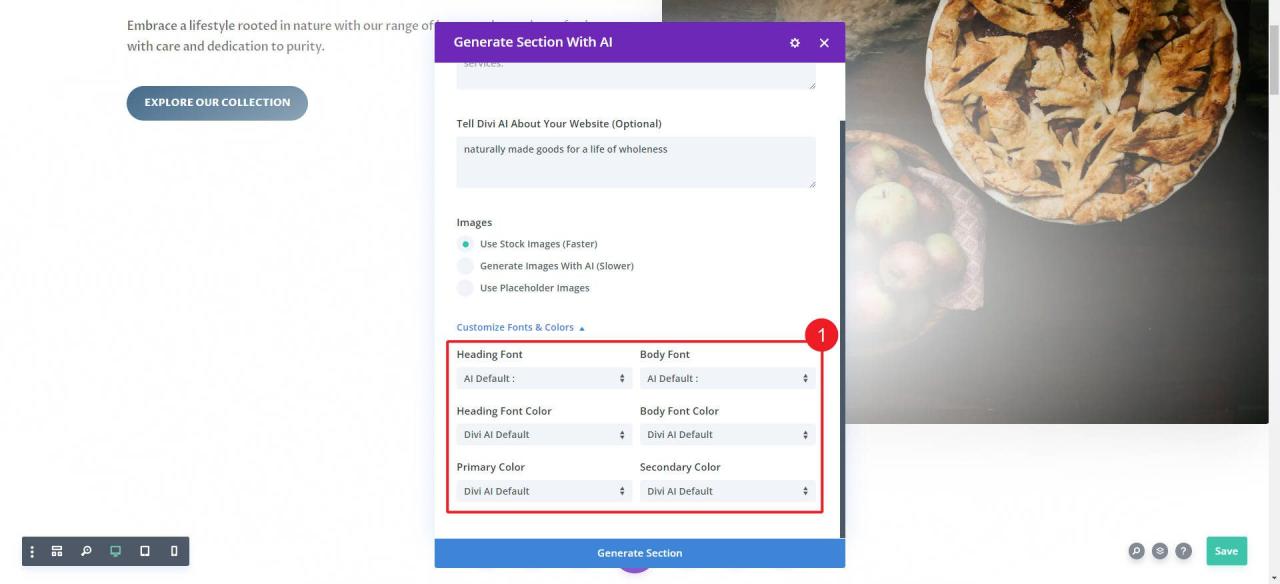
Creating personalized layouts using AI involves a systematic approach that leverages advanced algorithms to generate designs aligned with specific requirements. This process enables designers and developers to produce visually appealing and functional layouts efficiently, reducing manual effort and increasing creativity.
Understanding how to input precise parameters, interpret AI-generated suggestions, and implement these recommendations effectively can significantly enhance the design workflow. This section provides a detailed, step-by-step methodology to harness AI’s capabilities for crafting tailored layouts, illustrated with a practical example to demonstrate the process in action.
Step-by-Step Procedures for AI-Driven Layout Customization
Implementing AI for layout design requires a clear sequence of actions, from defining requirements to finalizing the design. The following steps Artikel this process in detail:
- Define Layout Objectives and Requirements: Articulate the purpose of the layout, target audience, aesthetic preferences, and functionality needs. Clearly specifying these parameters helps guide the AI in generating relevant design options.
- Input Parameters into AI Systems: Feed the defined requirements into the chosen AI platform or tool. Typical inputs include style preferences, grid dimensions, content hierarchy, color schemes, and specific constraints such as responsive design needs or accessibility standards.
- Configure AI Algorithm Settings: Adjust parameters related to layout complexity, variability, and design style within the AI tool. Customizing these settings allows for tailored outputs that better match project specifications.
- Generate Layout Suggestions: Initiate the AI process to produce multiple layout options based on the inputs. The system typically provides a set of designs with variations, enabling a broad spectrum of creative solutions.
- Interpret AI Suggestions: Review the generated layouts critically, assessing how well they align with the initial requirements. Focus on aspects such as visual balance, content placement, user flow, and aesthetic coherence.
- Refine and Select the Best Layout: Select the most suitable AI-generated design and make necessary adjustments to optimize it further. This may involve manual tweaks to improve usability or aesthetic appeal.
- Implement Final Design: Transfer the refined layout into the development environment, ensuring fidelity to the AI suggestion and adherence to project standards.
Below is a sample project demonstrating how different layout options can be presented and evaluated for a portfolio website redesign. The table summarizes potential AI-suggested layouts, their features, and suitability for specific needs.
| Layout Option | Description | Best Use Case | Features |
|---|---|---|---|
| Grid Focus | A balanced grid layout emphasizing visual content with uniform spacing. | Portfolio sites showcasing visual work. | Responsive, minimal, easy to navigate, emphasizes images. |
| Asymmetrical Flow | Dynamic, asymmetrical layout with staggered content blocks. | Creative agencies or artists seeking modern aesthetics. | Unique visual interest, interactive elements, flexible content placement. |
| Single Column | Vertical layout prioritizing storytelling with a single content stream. | Personal blogs or narrative-driven portfolios. | Clean design, easy scrolling, clear content hierarchy. |
| Masonry Style | Tile-based layout with varying content sizes arranged organically. | Photography or art portfolios requiring diverse image sizes. | Visually engaging, flexible image display, adaptable to content variations. |
Techniques for Personalizing Layouts with AI
Personalizing layouts through AI involves leveraging advanced computational methods to tailor user experiences based on individual preferences, behaviors, and interactions. These techniques enable designers and developers to automate and optimize layout configurations, resulting in more engaging and efficient interfaces. Understanding the core AI methodologies behind this personalization is essential for implementing effective customization strategies.
Several AI techniques, including machine learning, neural networks, and pattern recognition, serve as the backbone for adapting layouts dynamically. These methods analyze user data, recognize preferences and behaviors, and then generate or modify layouts to align with individual needs. Proper training and fine-tuning of these models with relevant data are crucial to achieving high accuracy and meaningful personalization.
AI Techniques for Personalizing Layouts
Implementing AI-driven personalization involves a combination of sophisticated algorithms that interpret user data and generate customized layout recommendations. These techniques can be integrated at various stages of the design process, from initial data collection to real-time interface adjustments.
- Machine Learning – Utilized for analyzing large datasets of user interactions, machine learning algorithms can identify patterns and predict user preferences. For example, a news app might learn that a user prefers technology articles and subsequently rearrange the layout to feature relevant content prominently.
- Neural Networks – Designed to mimic the human brain, neural networks excel at recognizing complex patterns and relationships within data. They are particularly effective in personalizing visual layouts by recognizing subtle cues in user behavior, such as click patterns or scrolling habits, to optimize interface elements dynamically.
- Pattern Recognition – This technique involves detecting recurring behaviors or visual cues that signify user preferences. By recognizing patterns like frequently accessed sections or interaction sequences, AI systems can adapt layouts to streamline user workflows and highlight favored features.
These AI techniques are employed through various methods to enhance layout customization:
-
Collaborative filtering
– Uses data from multiple users to suggest layout modifications based on shared preferences, ideal for community-driven platforms.
-
Content-based filtering
– Focuses on individual user data, adapting layouts according to specific interests or previous interactions.
-
Reinforcement learning
– Enables systems to learn optimal layout configurations by receiving feedback from user interactions, continually improving personalization over time.
- Data Training and Model Fine-tuning – AI models are trained on historical user data, including clickstreams, time spent on sections, and interaction sequences. Continual learning from ongoing user activity allows these models to refine their predictions, ensuring ongoing relevance and accuracy in layout personalization.
By integrating these techniques and methods, organizations can create highly personalized interfaces that adapt seamlessly to individual user needs, improving user satisfaction and engagement significantly.
Best Practices for AI-assisted Layout Customization

Implementing AI-driven layout customization offers tremendous potential for creating tailored, efficient, and user-centric designs. However, to maximize benefits while maintaining ethical standards and usability, adopting best practices is essential. These guidelines ensure that AI tools are used effectively, responsibly, and in a manner that aligns with design goals and user expectations.AI-assisted customization should be approached with a strategic mindset that emphasizes data quality, ethical considerations, and user experience.
Proper testing and validation procedures are crucial to identify any issues early and confirm that AI-generated layouts meet the desired standards. Consistency and usability remain paramount, especially when integrating AI into established design workflows.
Guidelines for Effective and Ethical AI-driven Design Adjustments
Adhering to ethical principles and ensuring the effectiveness of AI-driven modifications involves a combination of transparent processes, data integrity, and user-centered focus. Clear guidelines empower designers to leverage AI tools responsibly, minimizing risks related to bias, privacy, or misalignment with intended design outcomes.
- Maintain Transparency: Clearly communicate how AI influences layout decisions, especially when these modifications significantly alter the user interface or user experience. Transparency builds trust and facilitates user acceptance.
- Ensure Data Privacy: Use anonymized or consented data for training and testing AI models to prevent privacy violations and comply with regulations such as GDPR or CCPA.
- Address Bias and Fairness: Regularly review AI outputs for potential biases that might affect different user groups. Incorporate diverse datasets and model audits to promote fairness.
- Align with Design Principles: Guarantee that AI modifications support core design principles such as accessibility, readability, and visual hierarchy. AI should enhance, not detract from, usability.
- Set Clear Objectives: Define the intended outcomes for AI customization, including specific metrics for success like engagement rates, navigation efficiency, or aesthetic consistency.
Procedures for Testing and Validating AI-generated Layouts
Systematic testing and validation of AI-generated layouts are vital for ensuring functionality, aesthetic appeal, and user satisfaction. These procedures help identify issues early in the design process, enabling corrections before deployment.
- Initial Review: Conduct a qualitative assessment of AI-created layouts to verify visual coherence, alignment with brand identity, and adherence to user accessibility standards.
- Usability Testing: Implement user testing sessions, involving representative users, to gather feedback on navigation ease, visual comfort, and overall satisfaction with AI-modified layouts.
- Performance Metrics: Employ analytics tools to monitor key indicators such as time on page, bounce rates, and conversion rates post-implementation, comparing them to baseline data.
- Iterative Refinement: Use test results to refine AI algorithms, retrain models with updated datasets, and optimize layout adjustments for better accuracy and alignment with user needs.
- Compliance Checks: Ensure all layouts comply with relevant standards and regulations, such as WCAG for accessibility and industry-specific branding guidelines.
Tips for Maintaining Consistency and Usability in AI-Customized Designs
Consistent and user-friendly designs are the foundation of effective digital experiences. When integrating AI into layout customization, maintaining these qualities requires deliberate strategies to preserve coherence and usability across all iterations.
- Establish Design Guidelines: Develop comprehensive style guides and design systems that serve as benchmarks for AI-generated layouts, ensuring consistency in colors, typography, spacing, and element placement.
- Implement Version Control: Track each AI-generated iteration to compare changes over time, enabling rollback if a new layout reduces usability or visual harmony.
- Prioritize User Feedback: Incorporate continuous user feedback loops to identify pain points or inconsistencies that AI modifications may introduce, adjusting algorithms accordingly.
- Maintain Visual Hierarchy: Ensure AI outputs reinforce clear visual hierarchies, facilitating intuitive navigation and content prioritization.
- Focus on Accessibility: Validate that AI-adjusted layouts meet accessibility standards, such as sufficient contrast and logical tab orders, to serve all users effectively.
Challenges and Limitations in AI Layout Customization
Implementing AI-driven layout customization offers significant advantages in efficiency and personalization, yet it also presents a series of technical and practical challenges. Recognizing these obstacles is essential for developing robust solutions that leverage AI effectively while mitigating potential drawbacks. This section explores common challenges encountered during AI layout customization, including issues related to bias, overfitting, and the erosion of creative control.
Additionally, practical strategies to address these limitations are discussed in detail, helping practitioners optimize AI applications for layout design.AI layout customization faces various inherent limitations that can impact the quality, relevance, and fairness of the generated designs. These limitations often stem from the nature of training data, algorithmic constraints, and the balance between automation and human input. Addressing these challenges requires a nuanced understanding of both technical and human factors to ensure AI tools support designers effectively without compromising ethical standards or creative integrity.
Technical Challenges in AI Layout Customization
The integration of AI into layout design introduces complex technical issues that can hinder the effective deployment of these tools.
- Bias in Training Data: AI models learn from historical data, which may contain biases reflecting societal prejudices or historical inequities. Such biases can lead to layouts that inadvertently reinforce stereotypes or exclude diverse perspectives, impacting user experience and inclusivity.
- Overfitting: When AI models are excessively trained on specific datasets, they tend to perform well on known data but poorly on new or unseen datasets. This limits the model’s ability to generate innovative or varied layouts, reducing adaptability across different contexts or user preferences.
- Model Generalization: Ensuring that AI models generalize well across various design styles and industry standards remains a challenge, particularly when datasets are limited or not sufficiently diverse.
Practical Limitations and Challenges
Beyond technical issues, practical challenges influence the effectiveness of AI in layout customization.
- Loss of Creative Control: Reliance on AI-generated layouts can diminish the designer’s ability to influence the creative process, potentially leading to generic or less innovative outputs that lack a distinctive brand identity.
- Quality Assurance: Automated layout generation might produce designs that require extensive review and manual adjustments, offsetting the efficiencies gained through automation.
- Integration Difficulties: Incorporating AI tools into existing design workflows can be complex, especially when compatibility issues arise with current software or processes.
Strategies to Mitigate Challenges and Limitations
Effective mitigation strategies are crucial for overcoming the limitations inherent in AI layout customization.
- Bias Detection and Correction: Regularly audit training datasets to identify bias, and incorporate diverse data sources to promote fairness. Techniques like data augmentation and bias mitigation algorithms can improve model neutrality.
- Preventing Overfitting: Apply techniques such as cross-validation, regularization, and early stopping during model training to enhance generalization capabilities. Using a varied dataset ensures the model learns robust features applicable across different scenarios.
- Maintaining Creative Control: Design AI tools that provide adjustable parameters, allowing designers to influence and fine-tune generated layouts actively. Incorporating human-in-the-loop approaches fosters a collaborative environment where AI assists rather than replaces human creativity.
- Quality Assurance Processes: Implement rigorous review workflows where AI-generated outputs are evaluated by experienced designers, ensuring that creative standards and brand consistency are maintained.
- Workflow Integration: Invest in compatible software platforms and provide adequate training to facilitate seamless integration of AI tools within existing design processes.
Comparison of Challenges and Potential Solutions
| Challenge | Potential Solution |
|---|---|
| Bias in Training Data | Regular data audits, diversity in data sources, bias mitigation algorithms |
| Overfitting | Cross-validation, regularization, diverse datasets, early stopping |
| Loss of Creative Control | Adjustable parameters, human-in-the-loop, collaborative design workflows |
| Quality Assurance | Manual review processes, iterative feedback, quality control standards |
| Integration Difficulties | Training, compatible software solutions, dedicated support teams |
Future Trends in AI and Layout Personalization

As artificial intelligence continues to evolve, its role in layout customization is poised for transformative advancements. Emerging innovations promise to redefine how designers and users interact with digital environments, making layouts more intuitive, adaptive, and personalized than ever before. This ongoing evolution will not only enhance user engagement and satisfaction but also streamline workflows and unlock new creative possibilities within the design industry.The future of AI-driven layout personalization is centered around increased responsiveness, autonomy, and contextual awareness.
Advancements in machine learning algorithms, combined with real-time data processing, are set to facilitate more dynamic and intelligent design systems. These developments will enable layouts to adapt seamlessly to user behaviors, preferences, and environmental factors, fostering more immersive and user-centric experiences.
Upcoming Innovations and Research Directions
Research efforts are increasingly directed towards creating systems that can predict user needs more accurately and respond instantaneously. Innovations such as deep learning models capable of understanding complex user interactions and intent are anticipated to become standard tools for layout customization. Additionally, efforts in explainable AI aim to make these adaptive systems more transparent, allowing designers and users to understand the reasoning behind layout changes and personalization choices.Key research trends include:
- Development of autonomous design systems that can generate and modify layouts without human intervention, based on high-level goals or contextual inputs.
- Integration of multimodal data sources, including voice commands, eye-tracking, and biometric feedback, to inform real-time layout adjustments.
- Advancements in generative models that can create novel layout options, blending aesthetic appeal with functional efficiency based on user context.
- Focus on ethical AI practices that ensure personalization respects user privacy, avoids bias, and promotes inclusive design.
Potential Developments in Real-Time Adaptive Layouts
Real-time adaptive layouts represent a significant leap forward in personalized user experiences. These systems leverage continuous data streams to modify interfaces dynamically, ensuring optimal usability across diverse scenarios. For example, in e-commerce platforms, layouts could shift instantly to highlight preferred products based on browsing history, or in educational apps, interfaces could adapt to a learner’s pace and style.Advances in sensor technology and edge computing will play crucial roles in enabling these capabilities.
Devices equipped with advanced sensors can gather context-specific data—such as location, activity level, or emotional state—and feed this information into AI models. These models will then process the inputs to make immediate layout adjustments, creating an environment that feels inherently responsive and tailored.
Impact on User Experience and Design Industries
The integration of predictive and adaptive AI systems will significantly elevate user satisfaction by providing more relevant, engaging, and effortless interactions. Users will experience interfaces that intuitively respond to their needs, reducing cognitive load and enhancing accessibility. In design industries, these trends will democratize creativity, allowing for rapid prototyping and highly personalized solutions at scale.Furthermore, autonomous design systems will enable businesses to optimize layouts continuously, leading to increased efficiency in marketing, content delivery, and user engagement strategies.
As AI-driven layout customization becomes more embedded in everyday digital interactions, both consumers and creators will benefit from more fluid, intelligent, and adaptive environments that evolve alongside user preferences and technological capabilities.
Conclusive Thoughts
In conclusion, mastering AI-driven layout customization opens up a realm of possibilities for creating unique, efficient, and user-centric websites. Staying informed about emerging trends and continuously refining your approach will ensure your designs stay ahead in a competitive environment. Embrace these technological advancements to unlock new levels of creativity and functionality in your projects.